
Overview

PostgreSQL Connection Manager is an SSIS Connection Manager for establishing connections to on-premises and hosted PostgreSQL databases. It supports standard PostgreSQL authentication and cloud-native identity authentication providers. It can be used with Database Source, Database Destination, CDC Source Plus, CDC Task Plus, Lookup Plus and Query.
Supported cloud platforms and services:
- Microsoft Azure Database for PostgreSQL
- Google Cloud SQL for PostgreSQL
- Amazon RDS for PostgreSQL
- Amazon Aurora PostgreSQL - Compatible Edition
- Supabase PostgreSQL
- Azure HorizonDB
Quick Start
In this section we will show you how to set up a PostgreSQL Connection Manager using Password authentication.
- Right-click on the Connection Manager canvas.
- Select New Connection.
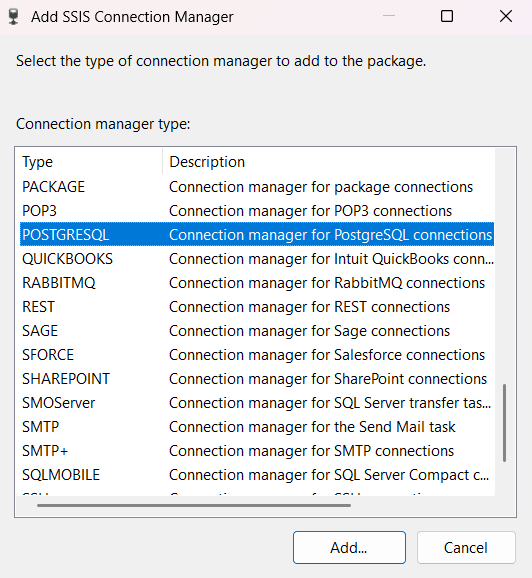
- When the list of connection managers appears, expand the Type column, if necessary, so you can see the complete names of the connection managers.
- Scroll down to find POSTGRESQL and select it.

- Once the connection manager dialog opens in General tab enter Host.
- Enter Port and Database.
- Select Password for Authentication.
- Enter Username.
- Enter Password.
- If needed configure Advanced connectivity settings in Advanced tab.

- Click on Test Connection.
- When you see Test connection succeeded, click OK.
- Click OK to close the connection manager dialog.
Congratulations! You have successfully configured a PostgreSQL Connection Manager.
In this section we will show you how to set up a PostgreSQL Connection Manager using Google Cloud IAM authentication.
- Right-click on the Connection Manager canvas.
- Select New Connection.
- When the list of connection managers appears, expand the Type column, if necessary, so you can see the complete names of the connection managers.
- Scroll down to find POSTGRESQL and select it.

- Once the connection manager dialog opens in General tab enter Host.
- Enter Port and Database.
- Select Google Cloud IAM for Authentication.
- Enter Username.
- Enter Client Email.
- Enter or select Key File (.p12).
- If needed configure Advanced connectivity settings in Advanced tab.

- Click on Test Connection.
- When you see Test connection succeeded, click OK.
- Click OK to close the connection manager dialog.
Congratulations! You have successfully configured a PostgreSQL Connection Manager.
In this section we will show you how to set up a PostgreSQL Connection Manager using AWS IAM authentication.
- Right-click on the Connection Manager canvas.
- Select New Connection.
- When the list of connection managers appears, expand the Type column, if necessary, so you can see the complete names of the connection managers.
- Scroll down to find POSTGRESQL and select it.
- Once the connection manager dialog opens in General tab enter Host.
- Enter Port and Database.
- Select AWS IAM for Authentication.
- Enter Username.
- Enter Secret Key.
- Enter Access Key.
- If needed configure Advanced connectivity settings in Advanced tab.

- Click on Test Connection.
- When you see Test connection succeeded, click OK.
- Click OK to close the connection manager dialog.
Congratulations! You have successfully configured a PostgreSQL Connection Manager.
In this section we will show you how to set up a PostgreSQL Connection Manager using Microsoft Entra ID authentication.
- Right-click on the Connection Manager canvas.
- Select New Connection.
- When the list of connection managers appears, expand the Type column, if necessary, so you can see the complete names of the connection managers.
- Scroll down to find POSTGRESQL and select it.

- Once the connection manager dialog opens in General tab enter Host.
- Enter Port and Database.
- Select Microsoft Entra ID for Authentication.
- Enter Username.
- Enter Client ID.
- Enter Client Secret.
- Enter Tenant ID.
- If needed configure Advanced connectivity settings in Advanced tab.

- Click on Test Connection.
- When you see Test connection succeeded, click OK.
- Click OK to close the connection manager dialog.
Congratulations! You have successfully configured a PostgreSQL Connection Manager.
Parameters
General
Use the General page of the PostgreSQL Connection Manager dialog to specify properties for connecting to PostgreSQL server.
Authentication mode used to connect to PostgreSQL. Supported values:
Authentication Description Password Standard PostgreSQL username/password authentication Azure Entra ID Microsoft Entra ID OAuth token authentication Google Cloud IAM Google Cloud SQL IAM database authentication Amazon RDS IAM AWS IAM database authentication using Signature Version 4 PostgreSQL server host name or IP address.
PostgreSQL server port number.
Name of the PostgreSQL database.
PostgreSQL user name.
PostgreSQL password. Used only with Password authentication mode.
Microsoft Entra application (client) ID.
Microsoft Entra tenant ID.
Microsoft Entra application client secret.
Path to the Google Cloud service account key file (.p12).
Google Cloud Service account email address.
AWS access key ID used to generate IAM authentication tokens.
AWS secret access key used to sign IAM authentication tokens.
Advanced
SSL/TLS mode used for the PostgreSQL connection. Supported values are Disable, Prefer and Require.
Interval in seconds between TCP keep-alive packets. A value of 0 disables keep-alive.
Enables connection pooling.
Minimum number of connections maintained in the connection pool.
Maximum number of connections allowed in the connection pool.
Knowledge Base
What's New
- New: Introduced connection.
Related documentation


COZYROC SSIS+ Components Suite is free for testing in your development environment.
A licensed version can be deployed on-premises, on Azure-SSIS IR and on COZYROC Cloud.