

COZYROC Salesforce components, part of COZYROC SSIS+ suite since 2009, are third-party plug-ins for Microsoft SSIS that make it easy to integrate or migrate data to and from Salesforce. They will preserve the integrity of your data by always using the SOAP-based and REST-based APIs. You can use any application, service or database supported by SQL Server Integration Services (SSIS) or COZYROC’s toolkit as the source or destination for Salesforce. The toolkit is easy to use and follows the same guidelines and principles used by the standard out-of-the-box SSIS components. In addition, COZYROC also provides short and informative demonstration videos, providing step-by-step instructions on how to get started.
The COZYROC SSIS+ library also includes the powerful and elegant Data Flow Task Plus, not found in any other competitive product on the market. Data Flow Task Plus allows creation of dynamic data flows at runtime and can be used with COZYROC's Salesforce adapters. You can create processes where the addition or deletion of Salesforce object fields doesn't necessitate modification of existing SSIS packages. This powerful feature requires no programming skills to use and greatly simplifies your maintenance efforts.
The Salesforce integration package consists of:
- Salesforce Connection Manager
- Stores the credentials and functionality for connecting to Salesforce service.
- Well documented API for use by user-defined scripts.
- Salesforce Source component
- Retrieves data from a Salesforce object.
- Input type can be either an object or a SOQL statement.
- The source can be dynamically modified at runtime using an SSIS expression.
- Supports retrieval of deleted and archived records.
- Salesforce Destination component
- Inserts or updates data in a Salesforce object.
- Supports four entity actions: Create, Update, Delete or Upsert.
- Provides information about records with errors as well as the unique identifier assigned for new records created.
- The destination can be dynamically modified at runtime using an SSIS expression.
- File Transfer Task
- Allows working with Salesforce Files (download, upload, etc.)
- Reusable scripts
- Unique technology which allows user-defined reusable scripts for additional Salesforce integration scenarios.
- Support both regular SOAP and bulk REST API.
Technical Specifications
Case Studies
 Salesforce Connection
Official documentation can be found here.
Step 1. On the left side of the Salesforce index page go to Apps - External Client Apps - External Client App Manager. Click the New External Client App button.

Step 2. Complete the required fields of the Basic Info form and tick the checkbox option for OAuth in the next section.

Step 3. Configure the OAuth2 settings. Keep in mind that both a Callback URL and the (refresh_token, offline_access) scope are required, even if they aren't used.

Step 4. Enable the JWT Flow and select the certificate you generated, for the specifics of generating a self-signed certificate click Cozyroc certificate guide or follow the guide in the Snowflake documentation.

Step 5. Create the app and after that edit it, now depending on your situation you may want to use different settings for the next step, but to get everything working you need both a privileged role and the Permitted Users setting set to Admin approved users are pre-authorized.

Step 6. After saving, go back to the Settings subnavigation menu and click the button Consumer Key and Secret button located under the OAuth Settings pane. Make note of the Consumer Key the secret is not needed for JWT authentication.

Step 7. Go back to Visual Studio and open your Sforce CM for editing. Click on the Authentication dropdown and select OAuth 2 JWT.

Step 8. Input the username you login to Salesforce with, the pfx/p12 file generated earlier, the password for the private key file and finally the Consumer Key you copied earlier.

Step 9. In the Advanced tab of your Sforce CM make sure the correct Server URL is selected.
NOTE: If you are using MyDomain for your Salesforce sandbox instance, the URL should look something like this: https://myproject.sandbox.my.salesforce.com/services/Soap/u/54.0. Otherwise, an "External client app is not installed in this org" may be thrown when trying to test the connection.

Step 10. Press the Test Connection button and verify it's success.

Official documentation can be found here.
Step 1. On the left side of the Salesforce index page go to Apps - External Client Apps - External Client App Manager. Click the New External Client App button.

Step 2. Complete the required fields of the Basic Info form and tick the checkbox option for OAuth in the next section.

Step 3. Configure the OAuth2 settings. Make sure that both Callback URL and the (refresh_token, offline_access) scope are set correctly. Callback URL: https://www.cozyroc.com/oauth_callback.

Step 4. Create the app and after that edit it, now depending on your situation you may want to use different settings for the next step, but to get everything working you need both a privileged role and the Permitted Users setting set to Admin approved users are pre-authorized.

Step 5. After saving, go back to the Settings subnavigation menu and click the button Consumer Key and Secret button located under the OAuth Settings pane. Make note of the Consumer Key and the Consumer Secret, they will be needed later.

Step 6. Go back to Visual Studio and open your Sforce CM for editing. Click on the Authentication dropdown and select OAuth 2 WS.

Step 7. From the token dropdown select New.

Step 8. In the token generation wizard, input the Consumer Key and Consumer Secret you saved earlier, then follow the on-screen instructions to generate a token.
NOTE: If you changed the token expiration time while creating the app, adjust the parameter accordingly.

Step 9. In the Advanced tab of your Sforce CM make sure the correct Server URL is selected.
NOTE: If you are using MyDomain for your Salesforce sandbox instance, the URL should look something like this: https://myproject.sandbox.my.salesforce.com/services/Soap/u/54.0. Otherwise an "External client app is not installed in this org" may be thrown when trying to test the connection.

Step 10. Press the Test Connection button and verify it's success.

Official documentation can be found here.
Step 1. On the left side of the Salesforce index page go to Apps - External Client Apps - External Client App Manager. Click the New External Client App button.

Step 2. Complete the required fields of the Basic Info form and tick the checkbox option for OAuth in the next section.

Step 3. Create the app and after that edit it, now depending on your situation you may want to use different settings for the next step, but to get everything working you need:
1. A privileged role
2. The External Apps Login User role
3. Permitted Users setting set to Admin approved users are pre-authorized.

Step 4. After saving, go back to the Settings subnavigation menu and set a Callback URL (it is not used) and the following scopes:
1. Manage user data via APIs (api)
2. Full access (full) - this scope is just for the test, we suggest you change it depending on your situation
3. Access Headless Passwordless Login API (pwdless_login_api)

Step 5. Click the button Consumer Key and Secret button located under the OAuth Settings pane. Make note of the Consumer Key and the Consumer Secret, they will be needed later.

Step 6. Upon clicking on your Profile Picture at the top right corner, a menu containing your Domain will pop up, make note of it as well. It is needed for your Connection Manager.

Step 7. Go back to Visual Studio and open your Sforce CM for editing. Click on the Authentication dropdown and select OAuth 2 CC.

Step 8. Input the Client ID and Secret.

Step 9. In the Advanced tab of your Sforce CM from the Server URL dropdown select the URL containing a "MY_DOMAIN" placeholder and replace it with the domain you copied from your account earlier.

Step 10. Press the Test Connection button and verify it's success.

Pages
Overview
 Salesforce Connection Manager is SSIS Connection Manager for establishing Salesforce connections. Use the API to build components based on Salesforce Connection Manager.
Quick Start
In this section we will show you how to set up a Salesforce Connection Manager to access your Salesforce service.
- Right-click on the Connection Manager canvas.
- Select New Connection.

- When the list of connection managers appears, expand the Type column, if necessary, so you can see the complete names of the connection managers.
- Scroll down the list to find the SFORCE connection manager and select it.

- Once the connection manager dialog opens, enter your User name, which is an email address associated with your Salesforce account.
- Enter your Password, which is your Salesforce password with your security token appended after it (no spaces and do not add a '+' character in between. You only want to concatenate the two.).
- Click on Test Connection.

- On the Advanced tab, enter the correct Server URL for the Salesforce soap version you want to use. Example: https://login.salesforce.com/services/Soap/u/48.0
(Please see the What's New section on this page to see which versions of Salesforce soap can be used for the version of COZYROC you have installed. If you leave this blank then the component will default to the highest version for the COZYROC version you have installed.)

- When you see Test Connection succeeded, click OK.
- Click OK to close the connection manager dialog.
Congratulations! You have successfully configured a Salesforce connection manager.

Official documentation can be found here.
Step 1. On the left side of the Salesforce index page go to Apps - External Client Apps - External Client App Manager. Click the New External Client App button.
Step 2. Complete the required fields of the Basic Info form and tick the checkbox option for OAuth in the next section.
Step 3. Configure the OAuth2 settings. Keep in mind that both a Callback URL and the (refresh_token, offline_access) scope are required, even if they aren't used.
Step 4. Enable the JWT Flow and select the certificate you generated, for the specifics of generating a self-signed certificate click Cozyroc certificate guide or follow the guide in the Snowflake documentation.
Step 5. Create the app and after that edit it, now depending on your situation you may want to use different settings for the next step, but to get everything working you need both a privileged role and the Permitted Users setting set to Admin approved users are pre-authorized.
Step 6. After saving, go back to the Settings subnavigation menu and click the button Consumer Key and Secret button located under the OAuth Settings pane. Make note of the Consumer Key the secret is not needed for JWT authentication.
Step 7. Go back to Visual Studio and open your Sforce CM for editing. Click on the Authentication dropdown and select OAuth 2 JWT.
Step 8. Input the username you login to Salesforce with, the pfx/p12 file generated earlier, the password for the private key file and finally the Consumer Key you copied earlier.
Step 9. In the Advanced tab of your Sforce CM make sure the correct Server URL is selected.
NOTE: If you are using MyDomain for your Salesforce sandbox instance, the URL should look something like this: https://myproject.sandbox.my.salesforce.com/services/Soap/u/54.0. Otherwise, an "External client app is not installed in this org" may be thrown when trying to test the connection.
Step 10. Press the Test Connection button and verify it's success.
Official documentation can be found here.
Step 1. On the left side of the Salesforce index page go to Apps - External Client Apps - External Client App Manager. Click the New External Client App button.
Step 2. Complete the required fields of the Basic Info form and tick the checkbox option for OAuth in the next section.
Step 3. Configure the OAuth2 settings. Make sure that both Callback URL and the (refresh_token, offline_access) scope are set correctly. Callback URL: https://www.cozyroc.com/oauth_callback.
Step 4. Create the app and after that edit it, now depending on your situation you may want to use different settings for the next step, but to get everything working you need both a privileged role and the Permitted Users setting set to Admin approved users are pre-authorized.
Step 5. After saving, go back to the Settings subnavigation menu and click the button Consumer Key and Secret button located under the OAuth Settings pane. Make note of the Consumer Key and the Consumer Secret, they will be needed later.
Step 6. Go back to Visual Studio and open your Sforce CM for editing. Click on the Authentication dropdown and select OAuth 2 WS.
Step 7. From the token dropdown select New.
Step 8. In the token generation wizard, input the Consumer Key and Consumer Secret you saved earlier, then follow the on-screen instructions to generate a token.
NOTE: If you changed the token expiration time while creating the app, adjust the parameter accordingly.
Step 9. In the Advanced tab of your Sforce CM make sure the correct Server URL is selected.
NOTE: If you are using MyDomain for your Salesforce sandbox instance, the URL should look something like this: https://myproject.sandbox.my.salesforce.com/services/Soap/u/54.0. Otherwise an "External client app is not installed in this org" may be thrown when trying to test the connection.
Step 10. Press the Test Connection button and verify it's success.
Official documentation can be found here.
Step 1. On the left side of the Salesforce index page go to Apps - External Client Apps - External Client App Manager. Click the New External Client App button.
Step 2. Complete the required fields of the Basic Info form and tick the checkbox option for OAuth in the next section.
Step 3. Create the app and after that edit it, now depending on your situation you may want to use different settings for the next step, but to get everything working you need:
1. A privileged role
2. The External Apps Login User role
3. Permitted Users setting set to Admin approved users are pre-authorized.
Step 4. After saving, go back to the Settings subnavigation menu and set a Callback URL (it is not used) and the following scopes:
1. Manage user data via APIs (api)
2. Full access (full) - this scope is just for the test, we suggest you change it depending on your situation
3. Access Headless Passwordless Login API (pwdless_login_api)
Step 5. Click the button Consumer Key and Secret button located under the OAuth Settings pane. Make note of the Consumer Key and the Consumer Secret, they will be needed later.
Step 6. Upon clicking on your Profile Picture at the top right corner, a menu containing your Domain will pop up, make note of it as well. It is needed for your Connection Manager.
Step 7. Go back to Visual Studio and open your Sforce CM for editing. Click on the Authentication dropdown and select OAuth 2 CC.
Step 8. Input the Client ID and Secret.
Step 9. In the Advanced tab of your Sforce CM from the Server URL dropdown select the URL containing a "MY_DOMAIN" placeholder and replace it with the domain you copied from your account earlier.
Step 10. Press the Test Connection button and verify it's success.
Parameters
Server
Use the Server page of the Salesforce Connection Manager dialog to specify properties for connecting to Salesforce service.
- Test Connection
- Confirm connection manager configuration by clicking Test Connection.
Specify user name in email-like format.
Specify password to access Salesforce service.
Specify the number of seconds before timing out session connect. The default value of this property is 60 seconds.
Specify if all clients should use the same connection. This property has the options listed in the following table.
Value Description True All clients use same connection (default). False Every client use different connection. This parameter is not visible in the connection manager dialog.
Advanced
Use the Advanced page of the Salesforce Connection Manager dialog to to specify additional properties for your connection to the Salesforce service.
Specify Salesforce service URL. This property should be explicitly specified when doing sandbox testing. Sample URLs:
- https://test.salesforce.com/services/Soap/u/9.0
- https://test.salesforce.com/services/Soap/c/17.0
- https://test.salesforce.com/services/Soap/u/20.0
Specify the ID of the organization against which you will authenticate Self-Service users.
Specify the ID of the portal for this organization.
Specify to allow duplicates to be preserved. For further information please check here.
Specify to allow field truncation. For further information please check here.
Specify to roll back all changes unless all records are processed successfully. For further information please check here.
Specify the Salesforce identifier of the assignment rule to be invoked when lead or case is created. For further information please check here.
Proxy
Use the Proxy page of the Salesforce Connection Manager dialog to specify properties if your server is behind firewall.
Specify the name or IP address of the proxy server. If not specified, proxy server is not used.
Specify the port number on the proxy server to use for the connection.
Specify user name to access the proxy server.
Specify password to access the proxy server.
Retry On Error
Use the Retry On Error page of the Salesforce Connection Manager dialog to specify properties for the optional error retry. This parameter only applies to the connection with Salesforce. It does not have any effect on errors for individual elements of data. The individual element errors can be directed to a destination (e.g. a file or table) via the Error Output.
Optional. Specify to retry only if the error message matches the RegEx pattern. If no RegEx pattern is provided, connection errors will automatically be retried. Specifying a RegEx pattern will indicate that only certain errors should be retried. If you want all connection errors to be retried, leave this property blank.
Specify the maximum request retry number.
Specify the number of seconds to pause between retries. The default is 30 seconds.
Knowledge Base
- Error Message: Salesforce Connection Manager: The operation has timed out.
- Where can I find the documentation for the Salesforce Connection?
- Error Message: INVALID_OPERATION: The SOAP Login operation is not available in the API version specified (67.0)
- Error Message: The underlying connection was closed: An unexpected error occurred on a send. (System.Web.Services)
- How to make sure Salesforce Connection Manager is using only TLS 1.2 protocol?
Related scripts
What's New
- New: Updated web service proxy to version 67.
- New: Support for OAuth 2.0 code authentication.
- New: Support for OAuth 2.0 JWT authentication.
- New: Updated web service proxy to version 48.
- New: Updated web service proxy to version 45.
- New: Updated web service proxy to version 42.
- New: Updated web service proxy to version 41.
- New: Updated web service proxy to version 37.
- New: Updated web service proxy to version 36.
- New: Enabled support for TLS 1.1 and 1.2 protocols.
- New: Updated web service proxy to version 30.
- New: A new parameter OrganizationId.
- New: A new parameter PortalId.
- New: Updated web service proxy to version 26.
- New: Updated web service proxy to version 23.
- New: Updated web service proxy to version 19.
- New: Included support for proxy server.
- New: A new parameter ServerUrl to specify service URL. This is useful for sandbox testing (Thank you, Frank).
- New: Introduced connection.
Related documentation


Overview
 The Salesforce Source Component is an SSIS Data Flow Component for consuming data from the Salesforce Service.

Demonstration
Quick Start
In this section we will show you how to set up a Salesforce Source component.
- Before you begin, configure a Salesforce connection manager.
- Drag the Data Flow Task from the SSIS Toolbox to the Control Flow canvas.
- Click the Data Flow tab to go to the Data Flow canvas.
- In the SSIS Toolbox, locate the Salesforce Source component and drag it onto the Data Flow canvas.
- Double-click on the component on the canvas.

- Once the component editor opens, select the connection manager you configured earlier from the Connection drop-down list.
- For Mode, either select Regular or Bulk.
- For Input, either select Object or Statement.
- If you selected Object, then select the object you want to work with from the drop-down list. You may also specify a Filter, as shown in the figure.

- If you selected Statement, then compose a SOQL statement to retrieve the object columns and records you want from the source.
- Click OK to close the component editor.
Congratulations! You have successfully configured the Salesforce Source component.

Parameters
Configuration
Use the parameters below to configure the component.
Select an existing Salesforce connection manager.
Related Topics: Salesforce Connection Manager
Specify the number of rows to be retrieved as a batch. The maximum is 2000.
Specify the input type. This parameter has the options listed in the following table.
Value Description Object Input type is Salesforce object. Selecting this value displays the dynamic parameters Object, ObjectFilter 1.5 SR-2. Statement Input type is a SOQL statement. Selecting this value displays the dynamic parameter Statement. After making this change, use the Refresh command in the 'Column Mappings' tab to reload the source object metadata.Select the read mode. This parameter has the options listed in the following table.
Value Description Regular Read data using regular mode (default). Bulk Read data using bulk mode. Select the Salesforce data object.
Specify the object filter statement using SOQL statement expressions.
Specify a SOQL statement.
Use this parameter to include all records in the result, including the deleted records. This parameter has the options listed in the following table.
Value Description True The deleted records are included in the result. False The deleted records are not included in the result. Specifies the amount of records to retrieve in PK Chunking bulk mode. If 0, PK Chunking is not used. The default is 0.
Knowledge Base
- Where can I find the documentation for the Salesforce Source?
- Error Message: "Failed to process ... for column COLUMN_NAME"
- Why am I unable to see a lookup field that is newly added in Salesforce?
- Error Message: MALFORMED_QUERY: unexpected token: True
- How to include the missing columns when using an SOQL statement
Related scripts
Samples
What's New
- New: A new parameter PKChunkSize to use PK Chunking bulk mode.
- Fixed: Got NULL when an output column name differs from an external column name. (Thank you, Lucas)
- Fixed: Failed with error "System.ObjectDisposedException: Cannot access a disposed object." when reading data in bulk. (Thank you, Venkat)
- New: Support for SOQL statements returning composite data.
- New: In case of an error when reading data in bulk, the component will retry.
- New: Included command to close job after the bulk read is complete.
- Fixed: Metadata initialization failed when specified SOQL statement did not return any rows (Thank you, Brett).
- Fixed: Id fields from related objects missing (Thank you, Ranjan).
- Fixed: Metadata of certain related fields was not configured.
- Fixed: Failed with error 'Unhandled type: urnRecordTypesSupported' (Thank you, Allen).
- Fixed: MALFORMED_QUERY error in design mode when using aggregate query with LIMIT clause.
- Fixed: Failed with error "INVALID_TYPE: sObject type '...__r' is not supported. If you are attempting to use a custom object, be sure to append the '__c' after the entity name. Please reference your WSDL or the describe call for the appropriate names." when trying to use relationship fields in SOQL statement (Thank you, Imran).
- New: Improved the metadata initialization when using SOQL statements (no more missing columns if the result contains empty fields).
- New: Support for Bulk mode for SOQL statements.
- Fixed: The "Preview" failed with "EXCEEDED_ID_LIMIT" error under some conditions.
- Fixed: Bulk job session is now closed at the end.
- New: Component can now retrieve deleted records in bulk mode.
- New: A new parameter Mode with two options: Regular and Bulk. When bulk mode is used, the component will use Salesforce bulk read functionality.
- Fixed: Component failed with "Failed to process ..." error when processing input columns of type binary.
- New: Component now supports aggregate SOQL statements (Thank you, Greg).
- Fixed: Component failed with “INVALID_TYPE: sObject type ‘…’ is not supported.” error when processing certain SOQL statements containing relationships (Thank you, Jonlee).
- New: A new parameter ObjectFilter.
- Fixed: Component failed with "INVALID_TYPE: sObject type '...' is not supported." error when processing certain SOQL statements containing relationships (Thank you, Ben).
- Fixed: Component failed to load object with more than 250 rows of data.
- New: A new parameter IncludeDeleted to retrieve all records, including deleted.
- New: Introduced component.
Related documentation
Overview
 The Salesforce Destination Component is an SSIS Data Flow Component for loading data into a Salesforce object.
Demonstration
Quick Start
In this section we will show you how to set up a Salesforce Destination component.
- Before you begin, configure a Salesforce connection manager.
- Configure a source component that will provide the data to be written to Salesforce.
- Ensure that you are on the Data Flow canvas.
- In the SSIS Toolbox, locate the Salesforce Destination component and drag it onto the Data Flow canvas.
- Connect the blue arrow from the source component or the data flow transformation that you want to immediately precede the Salesforce Destination component.
- Double-click on the component on the canvas.

- Once the component editor opens, select the connection manager you configured earlier from the Connection drop-down list.
- Choose the desired Action (Create, Update, Delete, or Upsert).
- Choose the Object you will be working with.
- The options will vary depending on the Action you selected. Check the options you desire. Descriptions of the options can be found in the Parameters section of the Salesforce Destination documentation.
- For Mode, either select Regular or Bulk.
- Click OK to close the component editor.

Congratulations! You have successfully configured the Salesforce Destination component.

Parameters
Configuration
Use the parameters below to configure the component.
Select an existing Salesforce connection manager.
Related Topics: Salesforce Connection Manager
Select a destination object action. This parameter has the options listed in the following table.
Action Description Create Create a new record in the destination object. Update Update an existing record in the destination object. You must specify the appropriate object record identifier for the update to work. Delete Delete an existing record from the destination object. You must specify the appropriate object record identifier for the delete to work. Upsert 1.4 SR-3 Update and insert a record in the destination object. Selecting this value displays the dynamic parameter ExternalId. After changing the action, you must use the Refresh command in the 'Column Mappings' tab to reload the destination object metadata.Specify the number of rows to be sent as a batch. The maximum for regular mode is 200. The maximum for bulk-load mode is 10,000.
Select bulk-load concurrency mode. This parameter has the options listed in the following table.
Value Description Parallel Process batches in parallel mode (default). Serial Process batches in serial mode. Processing in parallel can cause database contention. When this is severe, the job may fail. If you're experiencing this issue, submit the job with serial concurrency mode. This guarantees that batches are processed one at a time. Note that using this option may significantly increase the processing time for a job. Specify the destination Salesforce object where the data is to be loaded.
Specify the field for the external identifiers used in the upsert action.
Select the destination object processing mode. This parameter has the options listed in the following table.
Value Description Regular Process the data in regular mode. BulkData Process the data in bulk-load data mode. BulkBinary Process the data in bulk-load binary mode. Select variable to store bulk-load job identifier. Optional.
Specifies how NULL values are handled. This parameter has the options listed in the following table.
Options Description True The NULL values are ignored and not sent for processing. False The NULL values are sent for processing. Specify how to handle rows with errors.
Contains the unique identifier of the added, updated or deleted record.
Specify the relationship name for updating the foreign key lookup with an external identifier.
Specify the referenced object for updating the foreign key lookup with an external identifier.
Specify the external identifier field for updating the foreign key lookup with an external identifier.
Specify optional bulk job information in XML format. For further review Salesforce documentation. Optional.
Knowledge Base
- Where can I find the documentation for the Salesforce Destination?
- How can I accomplish a HardDelete in Salesforce Destination?
- Why am I unable to see a lookup field that is newly added in Salesforce?
- How to add timezone to the datetime column?
- Missing objects or columns when using Salesforce Destination Component
Related scripts
What's New
- New: Successfully processed rows are now reported in Result output. Only error rows are reported in the Error output.
- Fixed: Missing fields when using Update action (Thank you, Amit).
- Fixed: Id field was not included in the list of available mapping columns when using Upsert action.
- Fixed: IgnoreNullValue parameter didn't work properly when bulk-mode was used.
- Fixed: Component failed with error "type must be specified for polymorphic foreign key field: Who" (Thank you, Mustafa).
- New: A new parameter BulkJobInfo for optional bulk job information.
- Fixed: Component assumed input date/time columns without time zone information are local time and converted them to UTC. This broke backwards compatibility for existing packages (Thank you, Bharat).
- Fixed: Component will now convert input date/time columns to UTC time.
- New: A new parameter IgnoreNullValue.
- New: A new parameter Concurrency with two options: Parallel and Serial.
- New: Component now permits use of identifier lookup fields for the Upsert action.
- Fixed: Component failed with error "The remote name could not be resolved" when using bulk-load mode with test service instances.
- New: A new parameter JobIdVariable to store bulk job identifier in variable.
- Fixed: Component failed with "Column data type is not supported by PipelineBuffer class." error when processing input columns of type DT_DBDATE (Thank you, Ellen).
- New: Component can now update foreign key lookups with external identifier.
- New: Component now supports setting object fields to NULL.
- Fixed: Component failed with "... is not valid for the type xsd:double" when used in international environment (Thank you, Blazej).
- New: Component now provides newly created records identifier (Thank you, Sam).
- New: Component now supports Upsert action - update and insert of records (Thank you, Brian).
- New: Component now supports update and delete of records.
- Fixed: Component failed under SQL 2008 when ErrorDescription column was not used.
- New: Introduced component.
Related documentation
Overview

Configuration is provided for establishing connections with Salesforce Marketing service. The configuration is used in the REST Connection Manager.
Setup
Press  icon to get more information about the connection parameters.
Obtain data
Use REST Source component to get data from service resource.
Insert data
Use REST Destination component to insert data into service resource.
Quick Start
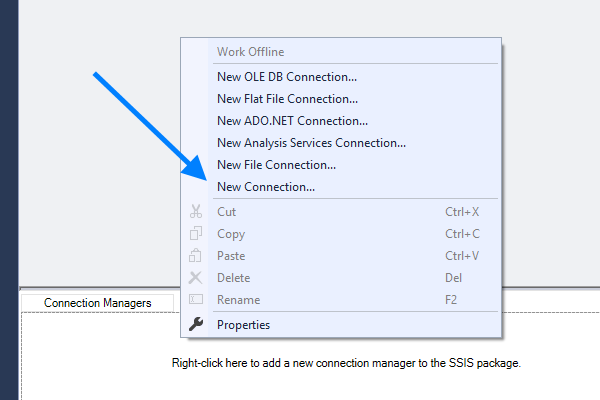
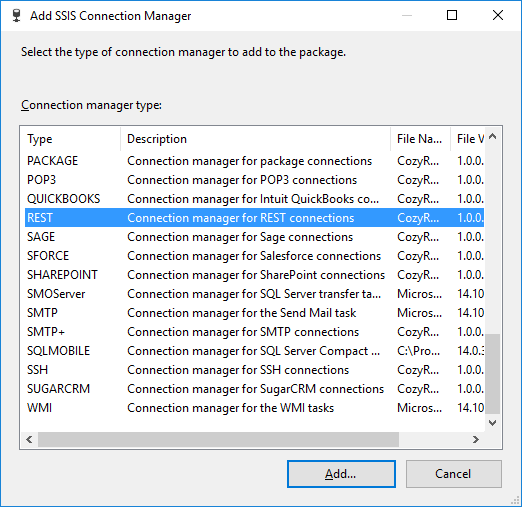
Step 1. Right click on "Connection Managers" tab and select "New Connection..."
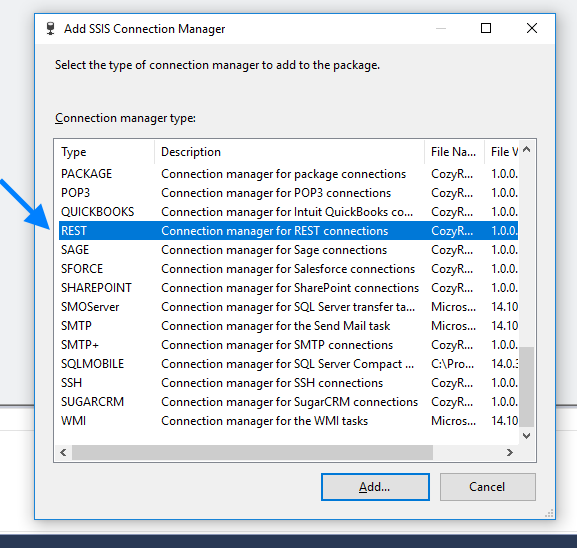
Step 2. In "Add SSIS Connection Manager" scroll down and select "REST connection manager" and click "Add..."
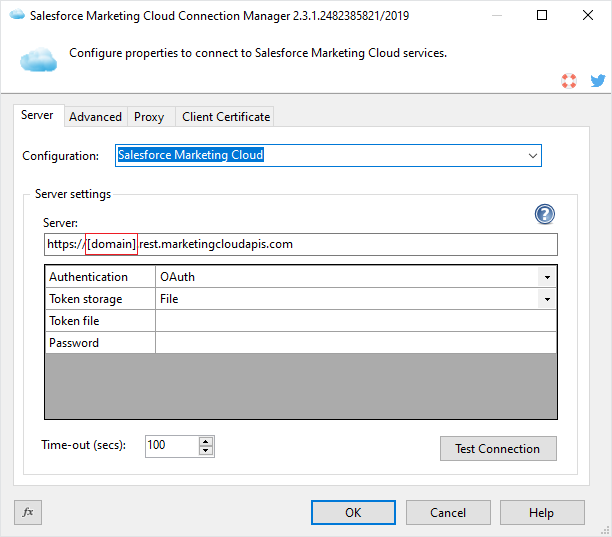
Step 3. From Configuration combo box select "Salesforce Marketing Cloud".
Step 4. Specify your domainin the Server parameter. The parameter should appear like https://[your domain].rest.marketingcloudapis.com.
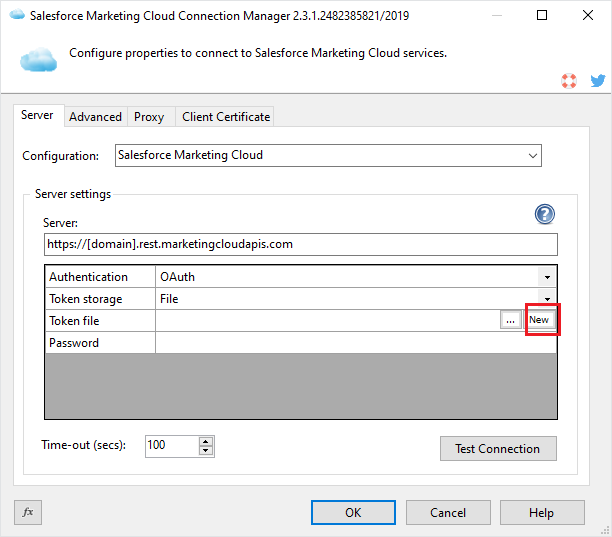
Step 5. Click New button to create a new token file.
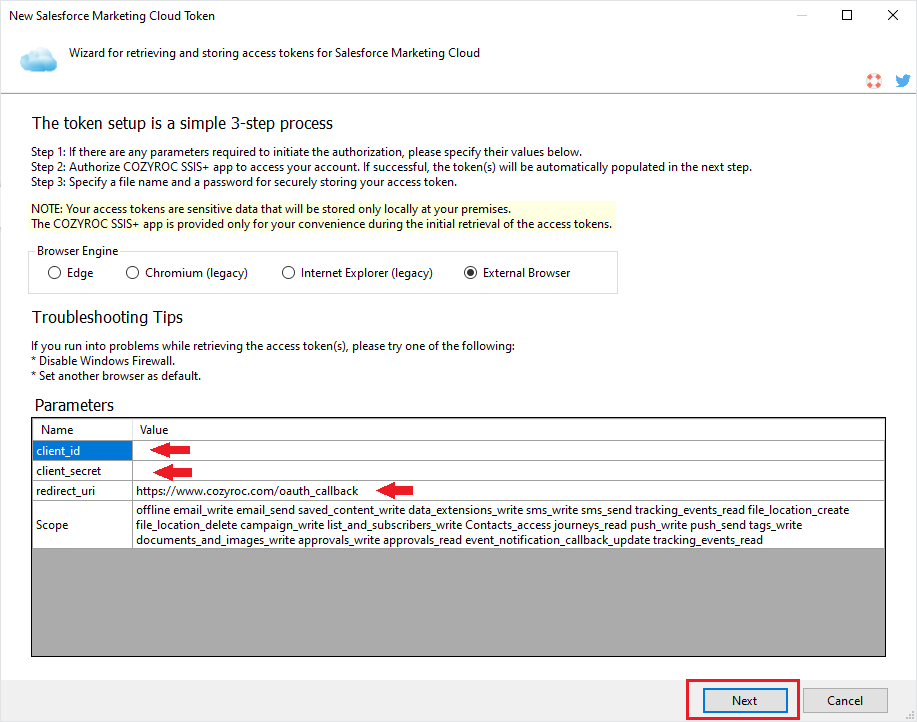
Step 6. In the Next Wizard, provide your credentials like client_id and client_secret for the required parameters and set the scopes to your desired scopes. Then click on the Next button.
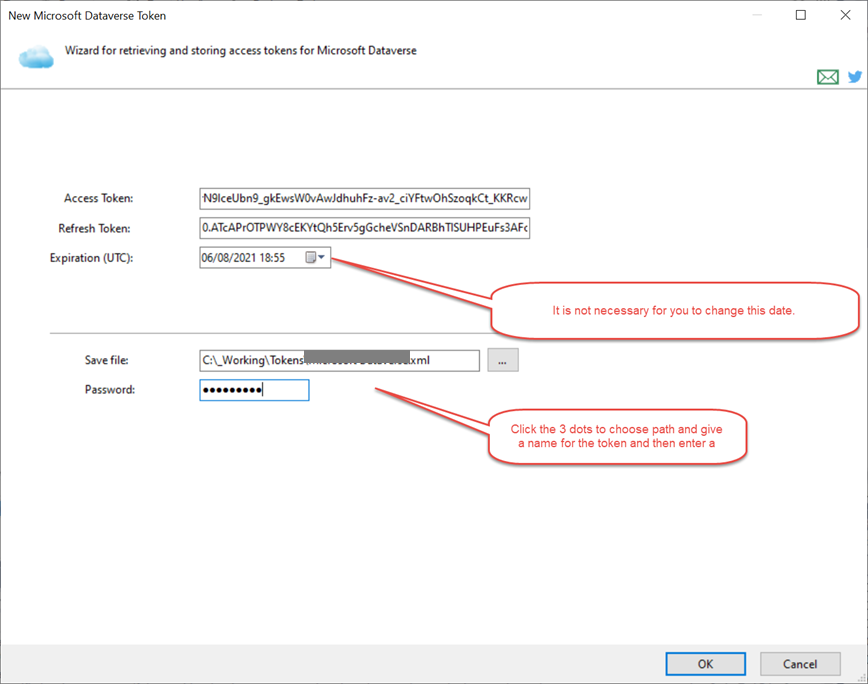
Step 7. After successfuly entering your credentials for the login, Create and Save your password protected token file. Click OK.
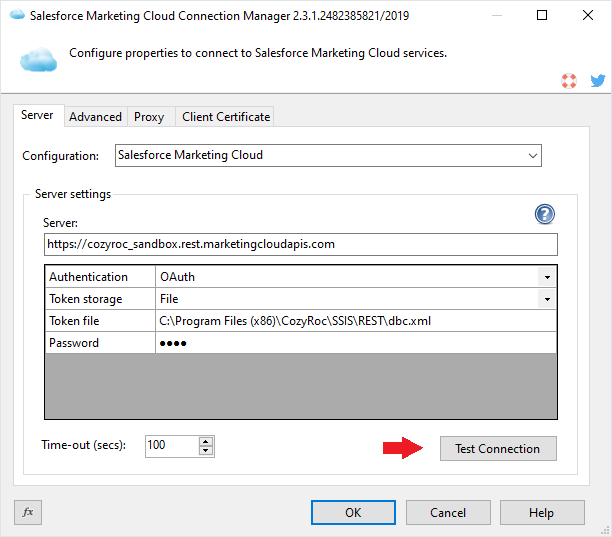
Step 8. Click "Test Connection" to test your connection.
Congratulations! You’ve successfully established a connection to your Salesforce Marketing Cloud instance. You’re now ready to begin integrating and working with your data.
This guide provides a step-by-step walkthrough on how to create a connection to the Salesforce Marketing Cloud REST API using COZYROC's REST Connection Manager using OAuth Client Credentials Flow.
Step 1: Add a REST Connection Manager by right-clicking in the Connection Managers area and selecting New Connection > REST.
Step 2: From the Configuration dropdown menu, select Salesforce Marketing Cloud. Set the Authentication type to Service.
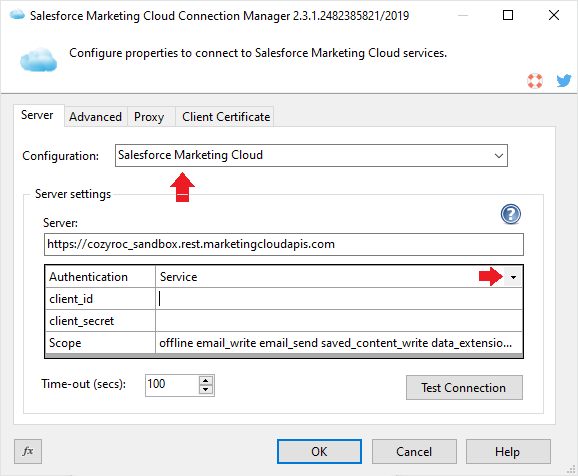
Step 3: Provide client_id, client_secret and set the scope to desired scopes. Then press Test Connection button.
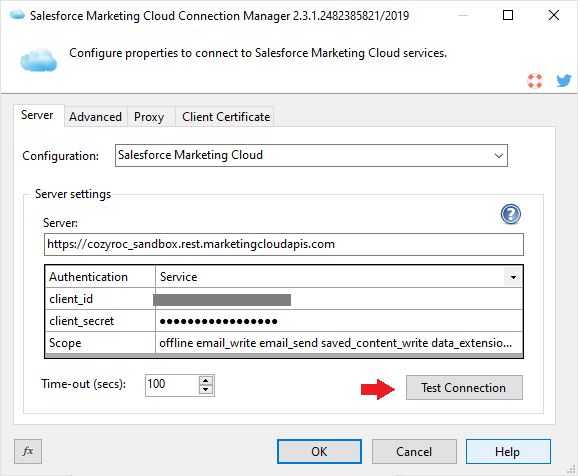
Congratulations! You’ve successfully established a connection to your Salesforce Marketing Cloud instance. You’re now ready to begin integrating and working with your data.
This guide demonstrates how to read data from the Salesforce Marketing Cloud service using the COZYROC REST Source component.
Step 1: Select an existing Data Flow Task or create a new Data Flow Task to begin configuring your data extraction.
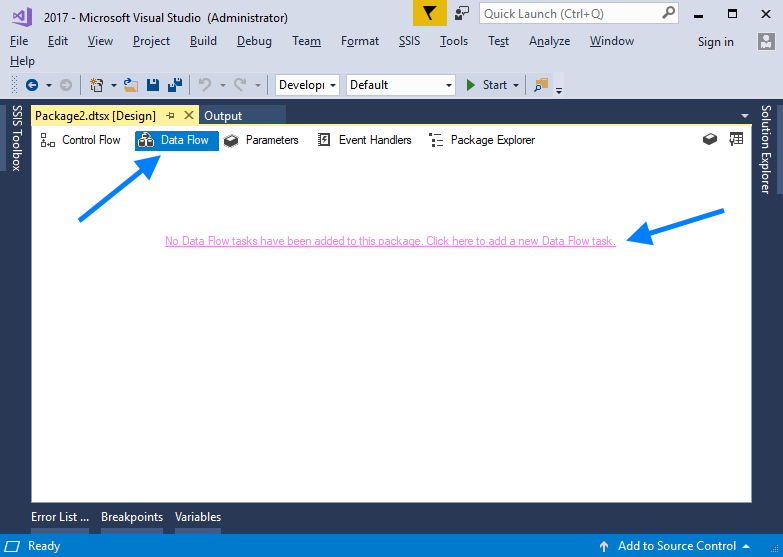
Step 2: Open the SSIS Toolbox, then drag and drop the COZYROC REST Source component onto the Data Flow design surface.
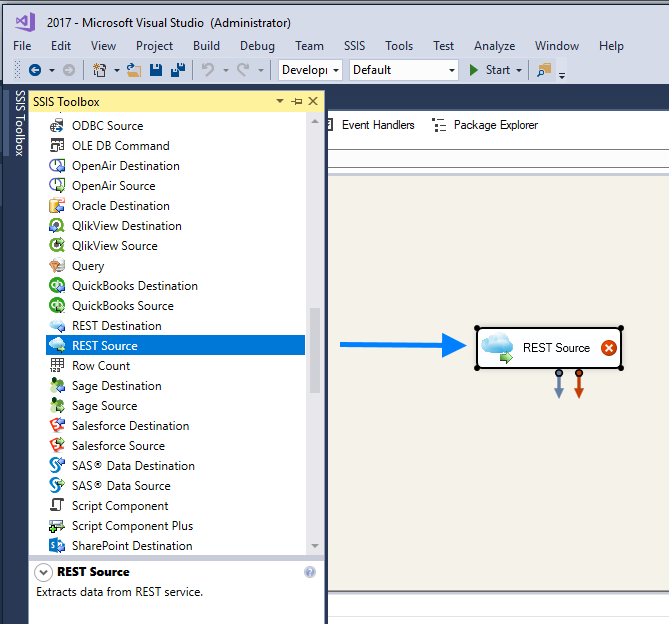
Step 3: Double-click the REST Source component to open its settings. From the dropdown menu, select your Salesforce Marketing Cloud connection. Then, choose the desired resource from the list available in the second dropdown below.
If necessary, you can add additional parameters in the grid at the bottom..
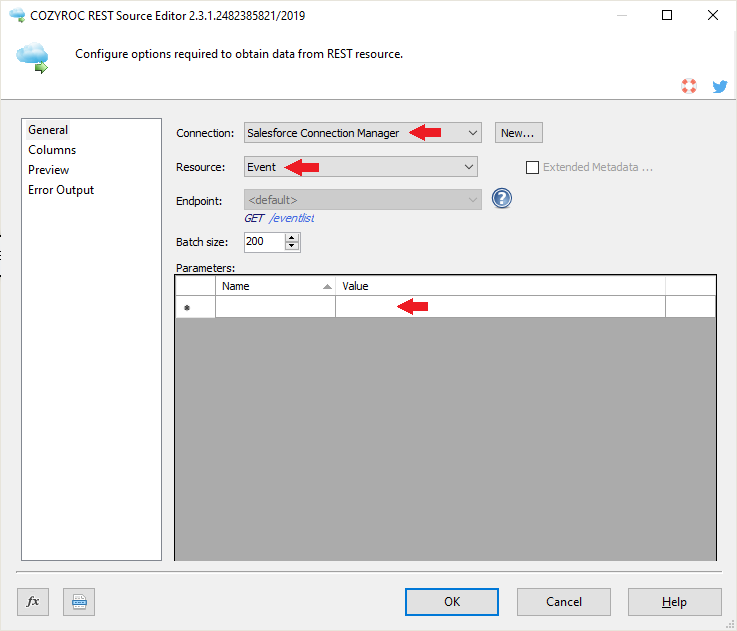
Step 4: Click on the Columns tab, then select the Salesforce Marketing Cloud resource columns you want to retrieve.
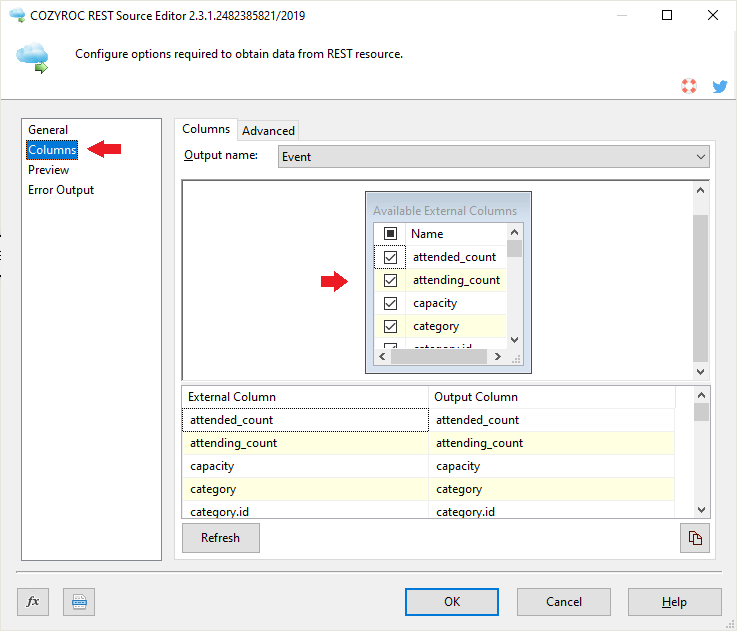
Step 5: Click Preview to verify that all the required resource columns are included.
Congratulations! You have successfully learned how to read data from the Salesforce Marketing Cloud service.
This guide provides a step-by-step demonstration on how to write data to the Salesforce Marketing Cloud service resource using the COZYROC REST Destination component.
Step 1: Select an existing Data Flow Task or create a new one.
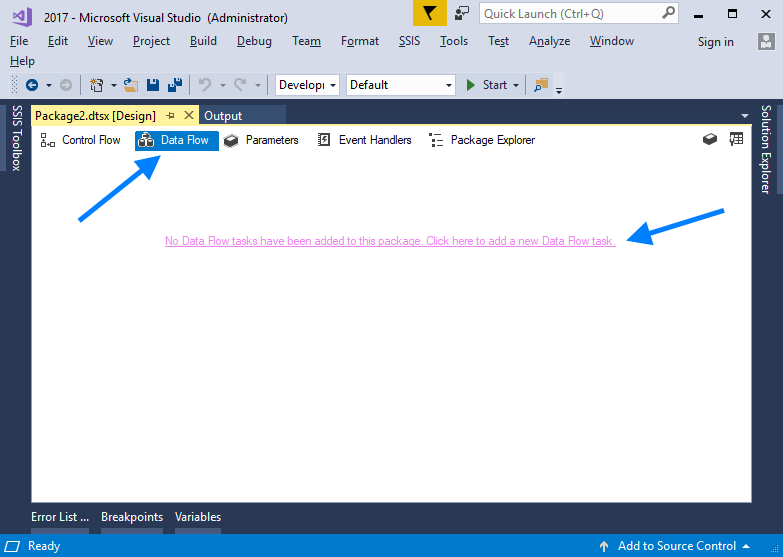
Step 2. Open the SSIS Toolbox, then drag and drop the COZYROC REST Destination component onto the design surface.
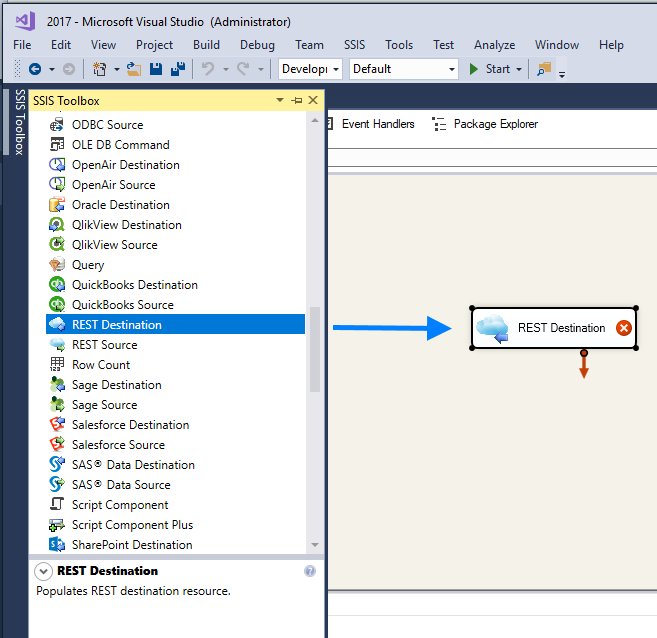
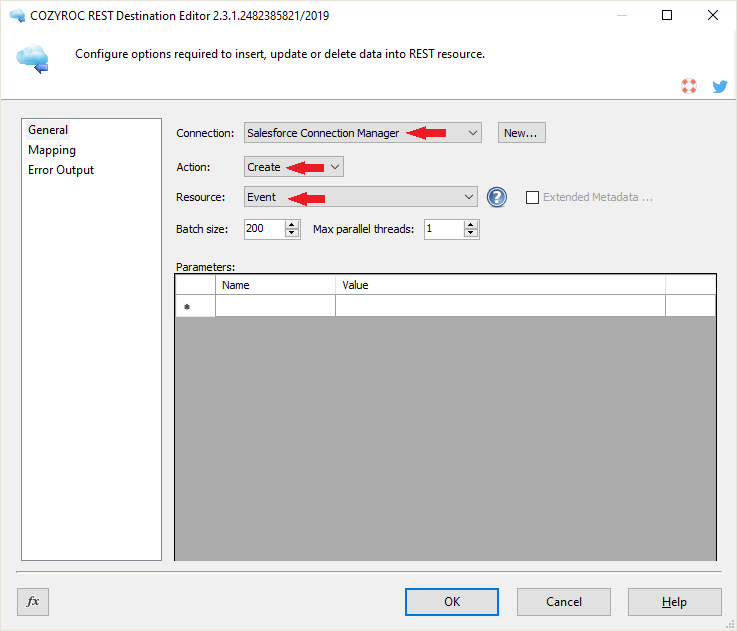
Step 3: Double-click the REST Destination component to open its settings. Select your Salesforce Marketing Cloud connection from the dropdown menu, then choose the desired resource action and the resource you wish to work with.
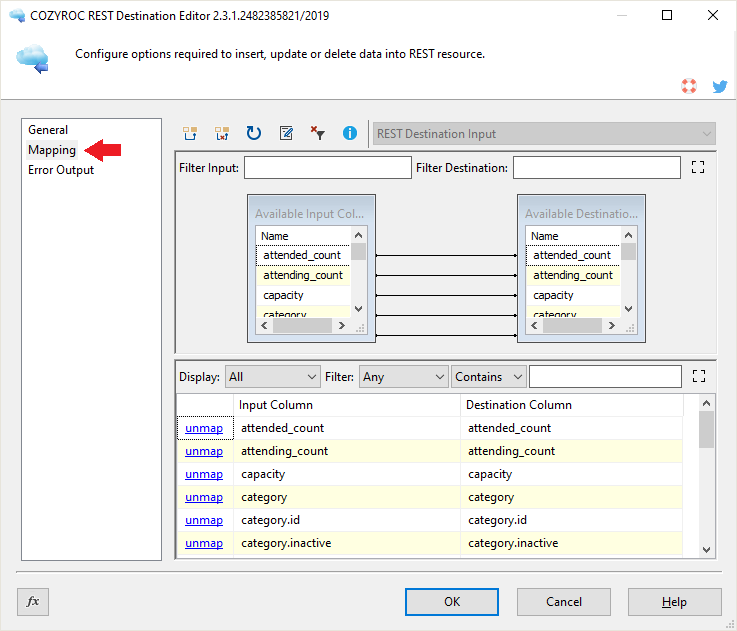
Step 4: Click the Mapping tab and map the input columns according to the process you are configuring.
If you need to provide input for other composite resource objects, adjust the inputs above accordingly and map the corresponding columns.
You’re all set! You have successfully learned how to write data to the Salesforce Marketing Cloud resource.
Configuration
Base URL address: https://[domain].rest.marketingcloudapis.com.
- OAuth
-
The authentication uses an authorized token. The token will be refreshed with the following expression:
{{=Date.now() + (response.expires_in - 300) * 1000}}.The authentication has the following user-defined parameters:
- client_id: Required. Specify client ID.
- client_secret: Required. Specify client secret.
- redirect_uri: Required. Specify redirect_uri.
- Scope: https://developer.salesforce.com/docs/atlas.en-us.mc-apis.meta/mc-apis/rest-permissions-and-scopes.htm
The following request parameters will be automatically processed during the authentication process:
-
Authorization:
Bearer {{=token.Access}}
Documentation: https://developer.salesforce.com/docs/atlas.en-us.mc-app-development.meta/mc-app-development/integration-app-auth-code.htm.
- Service
-
The authentication uses a session token.
The authentication has the following user-defined parameters:
- client_id: Required. Specify client ID.
- client_secret: Required. Specify client secret.
- Scope: https://developer.salesforce.com/docs/atlas.en-us.mc-apis.meta/mc-apis/rest-permissions-and-scopes.htm
The following request parameters will be automatically processed during the authentication process:
-
Authorization:
Bearer {{=token.Access}}
Documentation: https://developer.salesforce.com/docs/atlas.en-us.mc-app-development.meta/mc-app-development/integration-s2s-client-credentials.htm.
Based on resource template Base.
- [Create] action
-
Endpoint URL address:
/address/v1/validateEmail.Documentation: https://developer.salesforce.com/docs/marketing/marketing-cloud/references/mc_rest_address?meta=validateEmail.
Template: ShortText.
- validators
Template: LongText. A composite field.
Based on resource template Base.
- [Read] action
-
Endpoint URL address:
/hub/v1/approvals-v2.
The result is extracted from:{{=response.items}}.Documentation: https://developer.salesforce.com/docs/marketing/marketing-cloud/references/mc_rest_approvals/getApprovalItems.html.
- [Read Single] action
-
Endpoint URL address:
/hub/v1/approvals-v2/{{=parameters.approvalItemId}}.The action has the following user-defined parameters:
- approvalItemId: Required. Specify the approval item identifier.
Documentation: https://developer.salesforce.com/docs/marketing/marketing-cloud/references/mc_rest_approvals/getApprovalItem.html.
- [Create] action
-
Endpoint URL address:
/hub/v1/approvals-v2.Documentation: https://developer.salesforce.com/docs/marketing/marketing-cloud/references/mc_rest_approvals/createApprovalItem.html.
- approvalItemId
A key field. Template: ShortText.
- objectType
Template: ShortText.
- objectId
Template: ShortText.
- name
Template: ShortText.
- description
Template: LongText.
- workflowItemId
Template: ShortText.
- workflowState
Template: ShortText.
- workflowType
Template: ShortText.
- workflowName
Template: ShortText.
- deadline
Template: LongText. A composite field.
- commentCounts
Field components:
- Contains the following components: open, addressed, completed, total.
- workflowItem
Field components:
-
Uses template:
ShortText. - Contains the following components: workflowItemId, workflowRound, type, currentState, availableTransitions.
-
Uses template:
- blocked
Data type: DT_BOOL
- roles
The value is gathered from
/hub/v1/approvals-v2/{{=item.approvalItemId}}/rolesaddress. Field components:- An array.
- Contains the following components: RoleId, workflowRoleInstanceId, workflowRoleDefinitionId, key, users.
Based on resource template Base.
- [Read] action
-
Endpoint URL address:
/approvals-v2/settings.
The result is extracted from:{{=[response]}}.
The result is paginated.The following request parameters will be automatically processed:
-
$page:
{{=undefined}} -
$pagesize:
{{=undefined}}
Documentation: https://developer.salesforce.com/docs/marketing/marketing-cloud/references/mc_rest_approvals/getApprovalSettings.html.
-
$page:
- [Update] action
-
Endpoint URL address:
/approvals-v2/settings.Documentation: https://developer.salesforce.com/docs/marketing/marketing-cloud/references/mc_rest_approvals/updateApprovalSettings.html.
- key
Template: ShortText.
- value
Template: ShortText.
Based on resource template Base.
- [Read] action
-
Endpoint URL address:
/asset/v1/content/assets.
The result is extracted from:{{=response.items}}.The following request parameters will be automatically processed:
-
$fields:
{{=parameters.fields.join()}}
Documentation: https://developer.salesforce.com/docs/marketing/marketing-cloud/references/mc_rest_assets?meta=getAssetsSimpleQuery.
-
$fields:
- [Read Single] action
-
Endpoint URL address:
/asset/v1/content/assets/{{=parameters.assetId}}.The action has the following user-defined parameters:
- assetId: Required. Specify the asset identifier.
Documentation: https://developer.salesforce.com/docs/marketing/marketing-cloud/references/mc_rest_approvals/getApprovalItem.html.
- [Create] action
-
Endpoint URL address:
/asset/v1/content/assets.Documentation: https://developer.salesforce.com/docs/marketing/marketing-cloud/references/mc_rest_assets?meta=createAsset.
- [Update] action
-
Endpoint URL address:
/asset/v1/content/assets/{{=item.id}}.
The action uses PUT method.Documentation: https://developer.salesforce.com/docs/marketing/marketing-cloud/references/mc_rest_assets?meta=updateAsset.
- [Delete] action
-
Endpoint URL address:
/asset/v1/content/assets/{{=item.id}}.Documentation: https://developer.salesforce.com/docs/marketing/marketing-cloud/references/mc_rest_assets?meta=deleteAsset.
- id
A key field. Data type: DT_I4
- customerKey
Template: ShortText.
- objectID
Template: ShortText.
- assetType
Field components:
-
Uses template:
ShortText. - Contains the following components: id, name, displayName.
-
Uses template:
- fileProperties
Field components:
-
Uses template:
ShortText. - Contains the following components: fileName, fileSize, fileType, extension, fileCreatedDate, width, height, publishedURL.
-
Uses template:
- name
Template: ShortText.
- superContent
Template: ShortText.
- description
Template: LongText.
- owner
Template: UserT.
- createdDate
Template: DateTime. A read-only field.
- createdBy
Template: UserT.
- modifiedDate
Template: DateTime. A read-only field.
- modifiedBy
Template: UserT.
- enterpriseId
Data type: DT_I4
- memberId
Data type: DT_I4
- status
Template: IdName.
- category
Template: IdName.
- availableViews
Template: LongText. A composite field.
- modelVersion
Data type: DT_I4
- allowedBlocks
Template: LongText. A composite field.
- blocks
Field components:
- Contains the following components: header, image.
- businessUnitAvailability
Field components:
- Contains the following components: MID_001, MID_002.
- channels
Field components:
- Contains the following components: email, mobilePush, sms.
- content
Template: ShortText.
- contentType
Template: ShortText.
- customFields
Field components:
-
Uses template:
ShortText. - Contains the following components: campaign, priority.
-
Uses template:
- data
Field components:
-
Uses template:
ShortText. - Contains the following components: subject, preheader.
-
Uses template:
- design
Template: ShortText.
- generateFrom
Template: LongText.
- locked
Data type: DT_BOOL
- maxBlocks
Data type: DT_I4
- minBlocks
Data type: DT_I4
- sharingProperties
Template: SharingPropsT.
- slots
Field components:
-
Uses template:
SlotT. - Contains the following components: slot1, slot2.
-
Uses template:
- superContent
Template: ShortText.
- tags
Template: LongText. A composite field.
- template
Field components:
-
Uses template:
ShortText. - Contains the following components: templateId, templateName.
-
Uses template:
- version
Data type: DT_I4
- views
Field components:
- Contains the following components: desktop, mobile.
- data
Template: AssetCustomDataT.
- file
Template: LongText. The value is gathered from
/asset/v1/content/assets/{{=item.id}}/fileaddress.- action
Template: ShortText. Field components:
-
Uses template:
NoBodyActionT. - Contains the following components: restore, archive.
-
Uses template:
Based on resource template Base.
- [Read] action
-
Endpoint URL address:
/asset/v1/content/categories.
The result is extracted from:{{=response.items}}.Documentation: https://developer.salesforce.com/docs/marketing/marketing-cloud/references/mc_rest_assets?meta=getCategories.
- [Read Single] action
-
Endpoint URL address:
/asset/v1/content/categories/{{=SFMC.UI.CategoryEditor.getValue(parameters)}}.The action has the following user-defined parameters:
- categoryId: Required. Specify the category identifier.
Documentation: https://developer.salesforce.com/docs/marketing/marketing-cloud/references/mc_rest_assets?meta=getCategory.
- [Create] action
-
Endpoint URL address:
/asset/v1/content/categories.Documentation: https://developer.salesforce.com/docs/marketing/marketing-cloud/references/mc_rest_assets?meta=createCategory.
- [Update] action
-
Endpoint URL address:
/asset/v1/content/categories/{{=item.id}}.
The action uses PUT method.Documentation: https://developer.salesforce.com/docs/marketing/marketing-cloud/references/mc_rest_assets?meta=updateCategory.
- [Delete] action
-
Endpoint URL address:
/asset/v1/content/categories/{{=item.id}}.Documentation: https://developer.salesforce.com/docs/marketing/marketing-cloud/references/mc_rest_assets?meta=deleteCategory.
- id
A key field. Data type: DT_I4
- categoryType
Template: ShortText.
- description
Template: LongText.
- enterpriseId
Data type: DT_I4
- memberId
Data type: DT_I4
- name
Template: ShortText.
- parentId
Data type: DT_I4
- sharingProperties
Field components:
-
Uses template:
LongText. - Contains the following components: sharedWith, sharingType.
-
Uses template:
Based on resource template Data.
- [Read] action
-
Endpoint URL address:
/audit/auditEvents.
The result is extracted from:{{=response.items}}.The action has the following user-defined parameters:
- enddate: Specify the end date of the date range to search for events in ISO 8601 timestamp format.
- startdate: Specify the start date of the date range to search for events in ISO 8601 timestamp format.
Documentation: https://developer.salesforce.com/docs/marketing/marketing-cloud/references/mc_rest_audit?meta=getAuditEvents.
- id
A key field. Data type: DT_I4
- createdDate
Template: DateTime. A read-only field.
- memberId
Data type: DT_I4
- enterpriseId
Data type: DT_I4
- employee
Template: EmployeeAuditT.
- objectType
Template: IdName.
- operation
Template: IdName.
- object
Template: IdName.
- transactionId
Template: ShortText.
Based on resource template Data.
- [Read] action
-
Endpoint URL address:
/audit/securityEvents.
The result is extracted from:{{=response.items}}.The action has the following user-defined parameters:
- enddate: Specify the end date of the date range to search for events in ISO 8601 timestamp format.
- startdate: Specify the start date of the date range to search for events in ISO 8601 timestamp format.
Documentation: https://developer.salesforce.com/docs/marketing/marketing-cloud/references/mc_rest_audit?meta=getSecurityEvents.
- id
A key field. Data type: DT_I4
- createdDate
Template: DateTime. A read-only field.
- memberId
Data type: DT_I4
- enterpriseId
Data type: DT_I4
- employee
Template: EmployeeAuditT.
- ipAddress
Template: ShortText.
- eventType
Template: IdName.
- loginStatus
Template: IdName.
- eventSource
Template: IdName.
Based on resource template Base.
- [Read] action
-
Endpoint URL address:
/automation/v1/automations.
The result is extracted from:{{=response.items}}.Documentation: https://developer.salesforce.com/docs/marketing/marketing-cloud/references/mc_rest_automation_studio_automations?meta=getAutomations.
- [Read Single] action
-
Endpoint URL address:
/automation/v1/automations/{{=SFMC.UI.AutomationEditor.getValue(parameters)}}.The action has the following user-defined parameters:
- automationId: Required. Specify the unique identifier of the automation.
Documentation: https://developer.salesforce.com/docs/marketing/marketing-cloud/references/mc-custom_objects?meta=getDataExtension.
- [Create] action
-
Endpoint URL address:
/automation/v1/automations.Documentation: https://developer.salesforce.com/docs/marketing/marketing-cloud/references/mc_rest_automation_studio_automations?meta=createAutomation.
- id
A key field. Template: ShortText.
- name
Template: ShortText.
- description
Template: LongText.
- key
Template: ShortText.
- typeId
Data type: DT_I4
- type
Template: ShortText.
- statusId
Data type: DT_I4
- status
Template: ShortText.
- categoryId
Data type: DT_I4
- lastRunTime
Template: DateTime. A read-only field.
- lastRunInstanceId
Template: ShortText.
- schedule
Field components:
-
Uses template:
ShortText. - Contains the following components: scheduleStatus.
-
Uses template:
- fileTrigger
Field components:
-
Uses template:
ShortText. - Contains the following components: queueFiles, isPublished, fileNamePatternTypeId, fileNamingPattern, folderLocationText, triggerActive.
-
Uses template:
- automationTrigger
Field components:
-
Uses template:
ShortText. - Contains the following components: queueFiles, filenamePattern, filenamePatternTypeId, fileTransferLocationId, sampleFileName, status.
-
Uses template:
- steps
Field components:
- An array.
- Contains the following components: id, name, annotations, step, stepNumber, activities.
- startSource
Field components:
- Contains the following components: typeId, schedule.
- action
Template: ShortText. Field components:
-
Uses template:
NoBodyActionT. - Contains the following components: executeAutomationActivities.
-
Uses template:
Based on resource template Base.
- [Read] action
-
Endpoint URL address:
/automation/v1/fileTransfers.
The result is extracted from:{{=response.items}}.Documentation: https://developer.salesforce.com/docs/marketing/marketing-cloud/references/mc_rest_automation_studio_automations?meta=getFileTransferActivities.
- [Read Single] action
-
Endpoint URL address:
/automation/v1/fileTransfers/{{=SFMC.UI.FileTransferEditor.getValue(parameters)}}.The action has the following user-defined parameters:
- fileTransferActivityId: Required. Specify the unique identifier of the automation.
Documentation: https://developer.salesforce.com/docs/marketing/marketing-cloud/references/mc_rest_automation_studio_automations?meta=getFileTransferActivity.
- [Create] action
-
Endpoint URL address:
/automation/v1/fileTransfers.Documentation: https://developer.salesforce.com/docs/marketing/marketing-cloud/references/mc_rest_automation_studio_automations?meta=createFileTransferActivity.
- [Update] action
-
Endpoint URL address:
/automation/v1/fileTransfers/{{=item.id}}.Documentation: https://developer.salesforce.com/docs/marketing/marketing-cloud/references/mc_rest_automation_studio_automations?meta=updateFileTransferActivity.
- [Delete] action
-
Endpoint URL address:
/automation/v1/fileTransfers/{{=item.id}}.Documentation: https://developer.salesforce.com/docs/marketing/marketing-cloud/references/mc_rest_automation_studio_automations?meta=deleteFileTransferActivity.
- id
A key field. Template: ShortText.
- name
Template: ShortText.
- description
Template: LongText.
- customerKey
Template: ShortText.
- fileSpec
Template: ShortText.
- isEncrypted
Data type: DT_BOOL
- isCompressed
Data type: DT_BOOL
- maxFileAge
Data type: DT_I4
- maxFileAgeScheduleOffset
Data type: DT_I4
- maxImportFrequency
Data type: DT_I4
- publicKeyManagementId
Data type: DT_I4
- fileTransferLocationId
Template: ShortText.
- isUpload
Data type: DT_BOOL
- isPgp
Data type: DT_BOOL
- isFileSpecLocalized
Data type: DT_BOOL
- createdDate
Template: DateTime. A read-only field.
- modifiedDate
Template: DateTime. A read-only field.
- action
Template: ShortText. Field components:
-
Uses template:
NoBodyActionT. - Contains the following components: start.
-
Uses template:
Based on resource template Base.
- [Read] action
-
Endpoint URL address:
/hub/v1/campaigns/.
The result is extracted from:{{=response.items}}.Documentation: https://developer.salesforce.com/docs/marketing/marketing-cloud/references/mc_rest_campaigns?meta=getCampaigns.
- [Read Single] action
-
Endpoint URL address:
/hub/v1/campaigns/{{=SFMC.UI.CampaignEditor.getValue(parameters)}}.The action has the following user-defined parameters:
- campaignId: Required. Specify the unique identifier of the campaign.
Documentation: https://developer.salesforce.com/docs/marketing/marketing-cloud/references/mc_rest_campaigns?meta=getCampaign.
- [Create] action
-
Endpoint URL address:
/hub/v1/campaigns/.Documentation: https://developer.salesforce.com/docs/marketing/marketing-cloud/references/mc_rest_campaigns?meta=createCampaign.
- [Update] action
-
Endpoint URL address:
/hub/v1/campaigns/{{=item.id}}.Documentation: https://developer.salesforce.com/docs/marketing/marketing-cloud/references/mc_rest_campaigns?meta=updateCampaign.
- [Delete] action
-
Endpoint URL address:
/hub/v1/campaigns/{{=item.id}}.Documentation: https://developer.salesforce.com/docs/marketing/marketing-cloud/references/mc_rest_campaigns?meta=deleteCampaign.
- id
A key field. Template: ShortText.
- createdDate
Template: DateTime. A read-only field.
- modifiedDate
Template: DateTime. A read-only field.
- name
Template: ShortText.
- description
Template: LongText.
- campaignCode
Template: ShortText.
- color
Template: ShortText.
- favorite
Data type: DT_BOOL
- assets
The value is gathered from
/hub/v1/campaigns/{{=item.id}}/assetsaddress. The gathered value is processed with{{=response.items}}expression. Field components:- An array.
-
Uses template:
CampaignAssetT.
Based on resource template NoPaging.
- [Read] action
-
Endpoint URL address:
/campaigns/{{=SFMC.UI.CampaignEditor.getValue(parameters)}}/assets.
The result is extracted from:{{=response.items}}.The action has the following user-defined parameters:
- campaignId: Required. Specify the unique identifier of the campaign.
Documentation: https://developer.salesforce.com/docs/marketing/marketing-cloud/references/mc_rest_campaigns?meta=getCampaignAssets.
- [Read Single] action
-
Endpoint URL address:
/campaigns/{{=SFMC.UI.CampaignEditor.getValue(parameters)}}/assets/{{=parameters.assetId}}.The action has the following user-defined parameters:
- campaignId: Required. Specify the unique identifier of the campaign.
- assetId: Required. Specify the unique identifier of the asset.
Documentation: https://developer.salesforce.com/docs/marketing/marketing-cloud/references/mc_rest_campaigns?meta=getCampaignAsset.
- [Create] action
-
Endpoint URL address:
/campaigns/{{=SFMC.UI.CampaignEditor.getValue(parameters)}}/assets.The action has the following user-defined parameters:
- campaignId: Required. Specify the unique identifier of the campaign.
Documentation: https://developer.salesforce.com/docs/marketing/marketing-cloud/references/mc_rest_campaigns?meta=addAssetToCampaign.
- [Delete] action
-
Endpoint URL address:
/campaigns/{{=SFMC.UI.CampaignEditor.getValue(parameters)}}/assets/{{=item.id}}.The action has the following user-defined parameters:
- campaignId: Required. Specify the unique identifier of the campaign.
Documentation: https://developer.salesforce.com/docs/marketing/marketing-cloud/references/mc_rest_campaigns?meta=removeAssetFromCampaign.
The resource includes the fields from the CampaignAssetT template.
Based on resource template Base.
- [Read] action
-
Endpoint URL address:
/messaging/v1/domainverification.
The result is extracted from:{{=response.items}}.Documentation: https://developer.salesforce.com/docs/marketing/marketing-cloud/references/mc_rest_domain_verfication?meta=getDomains.
- [Create] action
-
Endpoint URL address:
/messaging/v1/domainverification.Documentation: https://developer.salesforce.com/docs/marketing/marketing-cloud/references/mc_rest_domain_verfication?meta=createDomain.
- [Update] action
-
Endpoint URL address:
/messaging/v1/domainverification/update.The following request parameters will be automatically processed:
-
application/json:
{{=[item]}}
Documentation: https://developer.salesforce.com/docs/marketing/marketing-cloud/references/mc_rest_domain_verfication?meta=updateDomain.
-
application/json:
- [Delete] action
-
Endpoint URL address:
/messaging/v1/domainverification/delete.The following request parameters will be automatically processed:
-
application/json:
{{=[item]}}
Documentation: https://developer.salesforce.com/docs/marketing/marketing-cloud/references/mc_rest_domain_verfication?meta=deleteDomain.
-
application/json:
- enterpriseId
Data type: DT_I4
- domain
Template: ShortText.
- status
Template: ShortText.
- domainType
Template: ShortText.
- isSendable
Data type: DT_BOOL
- memberId
Data type: DT_I4
- emailSendTime
Template: ShortText.
- emailAddress
Template: ShortText.
- action
Field components:
-
Uses template:
ActionT. - Contains the following components: register, push.
-
Uses template:
Based on resource template NoPaging.
- [Read] action
-
Endpoint URL address:
/platform/v1/ens-callbacks.
The result is extracted from:{{=response.items}}.Documentation: https://developer.salesforce.com/docs/marketing/marketing-cloud/references/mc_rest_event_notification/getAllCallbacks.html.
- [Read Single] action
-
Endpoint URL address:
/platform/v1/ens-callbacks/{{=SFMC.UI.CallbackEditor.getValue(parameters)}}.The action has the following user-defined parameters:
- callbackId: Required. Specify the unique identifier of the callback.
Documentation: https://developer.salesforce.com/docs/marketing/marketing-cloud/references/mc_rest_event_notification/getCallback.html.
- [Create] action
-
Endpoint URL address:
/platform/v1/ens-callbacks.The following request parameters will be automatically processed:
-
application/json:
{{=[item]}}
Documentation: https://developer.salesforce.com/docs/marketing/marketing-cloud/references/mc_rest_event_notification/createCallback.html.
-
application/json:
- [Update] action
-
Endpoint URL address:
/platform/v1/ens-callbacks.
The action uses PUT method.The following request parameters will be automatically processed:
-
application/json:
{{=[item]}}
Documentation: https://developer.salesforce.com/docs/marketing/marketing-cloud/references/mc_rest_event_notification/updateCallback.html.
-
application/json:
- [Delete] action
-
Endpoint URL address:
/platform/v1/ens-callbacks/{{=item.callbackId}}.Documentation: https://developer.salesforce.com/docs/marketing/marketing-cloud/references/mc_rest_event_notification/deleteCallback.html.
- callbackId
Template: ShortText.
- callbackName
Template: ShortText.
- url
Template: ShortText.
- maxBatchSize
Data type: DT_I4
- status
Template: ShortText.
- statusReason
Template: ShortText.
- subscription
The value is gathered from
/platform/v1/ens-subscriptions-by-cb/{{=item.callbackId}}address. Field components:- An array.
-
Uses template:
SubscriptionT.
Based on resource template NoPaging.
- [Read] action
-
Endpoint URL address:
/platform/v1/ens-subscriptions-by-cb/{{=SFMC.UI.CallbackEditor.getValue(parameters)}}.
The result is extracted from:{{=response.items}}.The action has the following user-defined parameters:
- callbackId: Required. Specify the unique identifier of the callback.
Documentation: https://developer.salesforce.com/docs/marketing/marketing-cloud/references/mc_rest_event_notification/getAllSubscriptionsForCallback.html.
- [Read Single] action
-
Endpoint URL address:
/platform/v1/ens-callbacks/{{=SFMC.UI.CallbackEditor.getValue(parameters)}}/{{=parameters.subscriptionId}}.The action has the following user-defined parameters:
- callbackId: Required. Specify the unique identifier of the callback.
- subscriptionId: Required. Specify the unique identifier of the subscriptions.
Documentation: https://developer.salesforce.com/docs/marketing/marketing-cloud/references/mc_rest_event_notification/getSubscription.html.
- [Create] action
-
Endpoint URL address:
/platform/v1/ens-subscriptions.The following request parameters will be automatically processed:
-
application/json:
{{=[item]}}
Documentation: https://developer.salesforce.com/docs/marketing/marketing-cloud/references/mc_rest_event_notification/createSubscription.html.
-
application/json:
- [Update] action
-
Endpoint URL address:
/platform/v1/ens-subscriptions.
The action uses PUT method.The following request parameters will be automatically processed:
-
application/json:
{{=[item]}}
Documentation: https://developer.salesforce.com/docs/marketing/marketing-cloud/references/mc_rest_event_notification/updateSubscription.html.
-
application/json:
- [Delete] action
-
Endpoint URL address:
/platform/v1/ens-subscriptions/{{=item.subscriptionId}}.Documentation: https://developer.salesforce.com/docs/marketing/marketing-cloud/references/mc_rest_event_notification/deleteSubscription.html.
The resource includes the fields from the SubscriptionT template.
Based on resource template Data.
- [Read] action
-
Endpoint URL address:
/filetransferlocations.
The result is extracted from:{{=response.items}}.
- [Read Single] action
-
Endpoint URL address:
/filetransferlocations/{{=parameters.customerKey}}.
The result is extracted from:{{=[response.fileTransferLocation]}}.The action has the following user-defined parameters:
- customerKey: Required. Specify the customerkey of the FileTransferLocation to retrieve.
Documentation: https://developer.salesforce.com/docs/marketing/marketing-cloud/references/mc-file_transfer_locations?meta=Get%2Ba%2Bfile%2Btransfer%2Blocation.
- [Create] action
-
Endpoint URL address:
/filetransferlocations.The following request parameters will be automatically processed:
-
application/json:
{{={ fileTransferLocation: item } }}
-
application/json:
- [Update] action
-
Endpoint URL address:
/filetransferlocation/{{=item.customerKey}}.The following request parameters will be automatically processed:
-
application/json:
{{={ fileTransferLocation: item } }}
-
application/json:
- [Delete] action
-
Endpoint URL address:
/filetransferlocation/{{=item.customerKey}}.
- customerKey
A key field. Template: ShortText.
- name
Template: ShortText.
- description
Template: LongText.
- locationType
Template: ShortText.
- awsFileTransferLocation
Field components:
-
Uses template:
ShortText. - Contains the following components: accessKeyId, roleArn, regionName, relativePath, bucketName, authType, customerKey, name, description, locationType.
-
Uses template:
Based on resource template Base.
- [Read] action
-
Endpoint URL address:
/push/v1/message.
The result is extracted from:{{=response.items}}.Documentation: https://developer.salesforce.com/docs/marketing/marketing-cloud/references/mc_rest_push?meta=Get%2BPush%2BMessages.
- [Read Single] action
-
Endpoint URL address:
/push/v1/message/{{=parameters.messageId}}.The action has the following user-defined parameters:
- messageId: Required. Specify the customerkey of the FileTransferLocation to retrieve.
Documentation: https://developer.salesforce.com/docs/marketing/marketing-cloud/references/mc_rest_push?meta=Get%2Ba%2BPush%2BMessage%2Bby%2BID.
- [Create] action
-
Endpoint URL address:
/push/v1/message.Documentation: https://developer.salesforce.com/docs/marketing/marketing-cloud/references/mc_rest_push?meta=Create%2Ba%2BPush%2BMessage.
- [Update] action
-
Endpoint URL address:
/push/v1/message/{{=item.id}}.
The action uses PUT method.Documentation: https://developer.salesforce.com/docs/marketing/marketing-cloud/references/mc_rest_push?meta=Update%2Ba%2BPush%2BMessage.
- [Delete] action
-
Endpoint URL address:
/push/v1/message/{{=item.id}}.Documentation: https://developer.salesforce.com/docs/marketing/marketing-cloud/references/mc_rest_push?meta=Delete%2Ba%2BPush%2BMessage.
- id
A key field. Template: ShortText.
- messageType
Data type: DT_I4
- contentType
Data type: DT_I4
- messageObjectId
Template: ShortText.
- name
Template: ShortText.
- tzPastSendAction
Data type: DT_I4
- sendInitiator
Data type: DT_I4
- status
Data type: DT_I4
- activeTimes
Template: LongText. A composite field.
- createdDate
Template: DateTime. A read-only field.
- lastUpdated
Template: DateTime. A read-only field.
- alert
Template: ShortText.
- sound
Template: ShortText.
- badge
Template: ShortText.
- content-available
Data type: DT_I4
- openDirect
Template: ShortText.
- custom
Template: PushMessageCustomT.
- startDate
Template: DateTime.
- endDate
Template: DateTime.
- messagesPerPeriod
Data type: DT_I4
- minutesPerPeriod
Data type: DT_I4
- numberOfPeriods
Data type: DT_I4
- periodType
Data type: DT_I4
- isRollingPeriod
Data type: DT_BOOL
- messageLimit
Data type: DT_I4
- tzBased
Data type: DT_BOOL
- scheduledTzOffset
Data type: DT_I4
- scheduledTzSupportsDst
Data type: DT_BOOL
- inclusionLists
Template: PushMessageListFenceT.
- exclusionLists
Template: PushMessageListFenceT.
- pageId
Data type: DT_I4
- url
Template: LongText.
- geofences
Template: PushMessageListFenceT.
- subject
Template: ShortText.
- application
Field components:
-
Uses template:
ShortText. - Contains the following components: id, name.
-
Uses template:
- media
Field components:
-
Uses template:
LongText. - Contains the following components: iosUrl, androidUrl, alt.
-
Uses template:
- keys
Field components:
- An array.
- Contains the following components: key, value.
Based on resource template NoPaging.
- [Read] action
-
Endpoint URL address:
/push/v1/application.Documentation: https://developer.salesforce.com/docs/marketing/marketing-cloud/references/mc_rest_push?meta=Get%2BApps.
- [Read Single] action
-
Endpoint URL address:
/push/v1/application/{{=SFMC.UI.ApplicationEditor.getValue(parameters)}}.The action has the following user-defined parameters:
- appId: Required. Specify the unique identifier of an app that receives push messages.
Documentation: https://developer.salesforce.com/docs/marketing/marketing-cloud/references/mc_rest_push?meta=Get%2Ban%2BApp%2Bby%2BID.
- id
A key field. Template: ShortText.
- messageCategories
Field components:
- An array.
- Contains the following components: id, name, buttons.
- key
Template: ShortText.
- name
Template: ShortText.
- description
Template: LongText.
- createdDate
Template: DateTime. A read-only field.
- modifiedDate
Template: DateTime. A read-only field.
- apnsEnabled
Data type: DT_BOOL
- gcmEnabled
Data type: DT_BOOL
- configuration
Field components:
- Contains the following components: customSound, openDirect, customKeys, payloadEditor, messageCategories.
- deviceEndpoint
Template: ShortText.
- keys
The value is gathered from
/push/v1/application/{{=item.id}}/keyaddress. Field components:-
Uses template:
LongText. - Contains the following components: keys.
-
Uses template:
Based on resource template NoPaging.
- [Read] action
-
Endpoint URL address:
/push/v1/application/{{=SFMC.UI.ApplicationEditor.getValue(parameters)}}/key.
The result is extracted from:{{={ keys: response } }}.The action has the following user-defined parameters:
- appId: Required. Specify the unique identifier of an app that receives push messages.
Documentation: https://developer.salesforce.com/docs/marketing/marketing-cloud/references/mc_rest_push?meta=Get%2BApp%2BKeys.
- [Update] action
-
Endpoint URL address:
/push/v1/application/{{=item.appId}}/key.
The action uses PUT method.The following request parameters will be automatically processed:
-
application/json:
{{=_.values(item.keys)}}
Documentation: https://developer.salesforce.com/docs/marketing/marketing-cloud/references/mc_rest_push?meta=Update%2BApp%2BKeys.
-
application/json:
- [Delete] action
-
Endpoint URL address:
/push/v1/application/{{=item.appId}}/key/{{=item.key}}.Documentation: https://developer.salesforce.com/docs/marketing/marketing-cloud/references/mc_rest_push?meta=Delete%2Ban%2BApp%2BKey.
- key
A key field. Template: ShortText.
- keys
Template: LongText. A composite field.
- appId
A key field. Template: ShortText.
Based on resource template Base.
- [Read] action
-
Endpoint URL address:
/messaging/v1/email/seed-lists.
The result is extracted from:{{=response.items}}.Documentation: https://developer.salesforce.com/docs/marketing/marketing-cloud/references/mc_rest_seedlist/messageReadAllSeedListsForAccount.html.
- [Read Single] action
-
Endpoint URL address:
/messaging/v1/email/seed-lists/{{=parameters.seedListId}}.The action has the following user-defined parameters:
- seedListId: Required. Specify the seed list identifier.
Documentation: https://developer.salesforce.com/docs/marketing/marketing-cloud/references/mc_rest_push?meta=Get%2Ba%2BPush%2BMessage%2Bby%2BID.
- [Create] action
-
Endpoint URL address:
/messaging/v1/email/seed-lists.Documentation: https://developer.salesforce.com/docs/marketing/marketing-cloud/references/mc_rest_seedlist/messageCreateSeedList.html.
- [Update] action
-
Endpoint URL address:
/messaging/v1/email/seed-lists/{{=item.id}}.Documentation: https://developer.salesforce.com/docs/marketing/marketing-cloud/references/mc_rest_seedlist/messageUpdateSeedListForAccount.html.
- [Delete] action
-
Endpoint URL address:
/messaging/v1/email/seed-lists/{{=item.id}}.Documentation: https://developer.salesforce.com/docs/marketing/marketing-cloud/references/mc_rest_seedlist/messageUpdateSeedListForAccount.html.
- id
A key field. Template: ShortText.
- name
Template: ShortText.
- description
Template: LongText.
- activeSeedCount
Data type: DT_I4
- seeds
Field components:
- An array.
Based on resource template NoPaging.
- [Read] action
-
Endpoint URL address:
/messaging/v1/email/seed-list-account.
The result is extracted from:{{=response.items}}.Documentation: https://developer.salesforce.com/docs/marketing/marketing-cloud/references/mc_rest_seedlist/messageReadAccountInfoForSeedList.html.
- [Update] action
-
Endpoint URL address:
/messaging/v1/email/seed-list-account.
The action uses PUT method.Documentation: https://developer.salesforce.com/docs/marketing/marketing-cloud/references/mc_rest_seedlist/messageUpdateAccountInfoForSeedList.html.
- autoSeedListID
Template: ShortText.
- autoSeedThreshold
Data type: DT_I4
- autoSeedEnabled
Data type: DT_BOOL
- autoSeedListName
Template: ShortText.
Based on resource template TransactionalMessaging.
- [Read] action
-
Endpoint URL address:
/email/definitions.
The result is extracted from:{{=response.definitions}}.
- [Read Single] action
-
Endpoint URL address:
/email/definitions/{{=parameters.definitionKey}}.The action has the following user-defined parameters:
- definitionKey: Required. Specify the key of the email send definition.
- [Create] action
-
Endpoint URL address:
/email/definitions.Documentation: https://developer.salesforce.com/docs/marketing/marketing-cloud/references/mc_rest_transactional_messaging_email?meta=Create%2Bemail%2Bsend%2Bdefinition .
- [Update] action
-
Endpoint URL address:
/email/definitions/{{=item.definitionKey}}.Documentation: https://developer.salesforce.com/docs/marketing/marketing-cloud/references/mc_rest_transactional_messaging_email?meta=Update%2Bemail%2Bsend%2Bdefinition .
- [Delete] action
-
Endpoint URL address:
/email/definitions/{{=item.definitionKey}}.
- definitionKey
A key field. Template: ShortText.
- requestId
Template: ShortText.
- name
Template: ShortText.
- definitionId
Template: ShortText.
- description
Template: LongText.
- classification
Template: ShortText.
- status
Template: ShortText.
- createdDate
Template: DateTime. A read-only field.
- modifiedDate
Template: DateTime. A read-only field.
- content
Field components:
-
Uses template:
ShortText. - Contains the following components: customerKey.
-
Uses template:
- subscriptions
Field components:
-
Uses template:
ShortText. - Contains the following components: list, autoAddSubscriber, updateSubscriber.
-
Uses template:
- options
Template: OptionT. Field components:
- Contains the following components: trackLinks.
- journey
Template: LongText. A composite field.
- queueMetrics
Template: QueueMetrics. The value is gathered from
/messaging/v1/email/definitions/{{=item.definitionKey}}/queueaddress.
Based on resource template TransactionalMessaging.
- [Read] action
-
Endpoint URL address:
/email/messages.
The result is extracted from:{{=response.messages}}.Documentation: https://developer.salesforce.com/docs/marketing/marketing-cloud/references/mc_rest_transactional_messaging_email?meta=Retrieve%2Bqueue%2Bmetrics .
- messageKey
A key field. Template: ShortText. The gathered value is processed with
{{=item.info.messageKey}}expression.- statusCode
Data type: DT_I4
- statusMessage
Template: ShortText.
- eventCategoryType
Template: ShortText.
- timestamp
Template: DateTime. A read-only field.
- definitionKey
Template: ShortText.
- eventID
Data type: DT_I4
- info
Field components:
-
Uses template:
ShortText. - Contains the following components: messageKey, contactKey, to.
-
Uses template:
Based on resource template NoPaging.
- [Read] action
-
Endpoint URL address:
/messaging/v1/email/messages/{{=parameters.messageKey}}.
The result is extracted from:{{=[response]}}.The action has the following user-defined parameters:
- messageKey: Required. Specify the unique key of the message to retrieve the status for.
- requestId
Template: ShortText.
- eventCategoryType
Template: ShortText.
- timestamp
Template: DateTime. A read-only field.
- compositeId
Template: ShortText.
- info
Field components:
-
Uses template:
ShortText. - Contains the following components: messageKey, contactKey, to.
-
Uses template:
- statusCode
Data type: DT_I4
- statusMessage
Template: ShortText.
Based on resource template NoPaging.
- [Read] action
-
Endpoint URL address:
/messaging/v1/email/definitions/{{=parameters.definitionKey}}/queue.
The result is extracted from:{{=[response]}}.The action has the following user-defined parameters:
- definitionKey: Required. Specify the key of the email send definition.
Documentation: https://developer.salesforce.com/docs/marketing/marketing-cloud/references/mc_rest_transactional_messaging_email?meta=Retrieve%2Bqueue%2Bmetrics .
- [Delete] action
-
Endpoint URL address:
/messaging/v1/email/definitions/{{=item.definitionKey}}/queue.Documentation: https://developer.salesforce.com/docs/marketing/marketing-cloud/references/mc_rest_transactional_messaging_email?meta=Delete%2Bqueue%2Bmetrics .
The resource includes the fields from the QueueMetrics template.
Based on resource template TransactionalMessaging.
- [Read] action
-
Endpoint URL address:
/push/definitions.
The result is extracted from:{{=response.definitions}}.Documentation: https://developer.salesforce.com/docs/marketing/marketing-cloud/references/mc_rest_transactional_messaging_push?meta=Get%2BPush%2BSend%2BDefinitions .
- [Read Single] action
-
Endpoint URL address:
/push/definitions/{{=parameters.definitionKey}}.The action has the following user-defined parameters:
- definitionKey: Required. Specify the user-defined key of a send definition for push messaging..
- [Create] action
-
Endpoint URL address:
/push/definitions.
- [Update] action
-
Endpoint URL address:
/push/definitions/{{=item.definitionKey}}.
- [Delete] action
-
Endpoint URL address:
/push/definitions/{{=item.definitionKey}}.
- definitionKey
A key field. Template: ShortText.
- name
Template: ShortText.
- status
Template: ShortText.
- createdDate
Template: DateTime. A read-only field.
- modifiedDate
Template: DateTime. A read-only field.
- applicationId
Template: ShortText.
- description
Template: ShortText.
- content
Field components:
-
Uses template:
ShortText. - Contains the following components: customerKey.
-
Uses template:
- options
Template: OptionT.
Based on resource template TransactionalMessaging.
- [Read] action
-
Endpoint URL address:
/ott/definitions/.
The result is extracted from:{{=response.definitions}}.Documentation: https://developer.salesforce.com/docs/marketing/marketing-cloud/references/mc_rest_transactional_messaging_ott?meta=Get%2Ball%2Bsend%2Bdefinitions .
- [Read Single] action
-
Endpoint URL address:
/ott/definitions/{{=parameters.definitionKey}}.The action has the following user-defined parameters:
- definitionKey: Required. Specify the unique identifier of the definition.
- [Create] action
-
Endpoint URL address:
/ott/definitions/.Documentation: https://developer.salesforce.com/docs/marketing/marketing-cloud/references/mc_rest_transactional_messaging_ott?meta=Create%2Ban%2BOTT%2Bsend%2Bdefinition .
- [Update] action
-
Endpoint URL address:
/ott/definitions/{{=item.definitionKey}}.Documentation: https://developer.salesforce.com/docs/marketing/marketing-cloud/references/mc_rest_transactional_messaging_ott?meta=Create%2Ban%2BOTT%2Bsend%2Bdefinition .
- [Delete] action
-
Endpoint URL address:
ott/definitions/{{=item.definitionKey}}.
- definitionKey
A key field. Template: ShortText.
- name
Template: ShortText.
- status
Template: ShortText.
- createdDate
Template: DateTime. A read-only field.
- modifiedDate
Template: DateTime. A read-only field.
- requestId
Template: ShortText.
- description
Template: ShortText.
- senderType
Template: ShortText.
- senderID
Template: ShortText.
- content
Field components:
-
Uses template:
ShortText. - Contains the following components: customerKey.
-
Uses template:
- options
Template: OptionT.
Based on resource template TransactionalMessaging.
- [Read] action
-
Endpoint URL address:
/sms/definitions/.
The result is extracted from:{{=response.definitions}}.Documentation: https://developer.salesforce.com/docs/marketing/marketing-cloud/references/mc_rest_transactional_messaging_sms/getSMSDefinitions.html.
- [Read Single] action
-
Endpoint URL address:
/sms/definitions/{{=parameters.definitionKey}}.The action has the following user-defined parameters:
- definitionKey: Required. Specify the unique identifier of the send definition.
Documentation: https://developer.salesforce.com/docs/marketing/marketing-cloud/references/mc_rest_transactional_messaging_sms/getSMSSendDefinition.html.
- [Create] action
-
Endpoint URL address:
/sms/definitions/.Documentation: https://developer.salesforce.com/docs/marketing/marketing-cloud/references/mc_rest_transactional_messaging_sms/createSMSSendDefinition.html.
- [Update] action
-
Endpoint URL address:
/sms/definitions/{{=item.definitionKey}}.Documentation: https://developer.salesforce.com/docs/marketing/marketing-cloud/references/mc_rest_transactional_messaging_sms/updateSMSMessageDefinition.html.
- [Delete] action
-
Endpoint URL address:
sms/definitions/{{=item.definitionKey}}.Documentation: https://developer.salesforce.com/docs/marketing/marketing-cloud/references/mc_rest_transactional_messaging_sms/deleteSMSMessageDefinition.html.
- definitionKey
A key field. Template: ShortText.
- name
Template: ShortText.
- status
Template: ShortText.
- createdDate
Template: DateTime. A read-only field.
- modifiedDate
Template: DateTime. A read-only field.
- requestId
Template: ShortText.
- description
Template: ShortText.
- senderType
Template: ShortText.
- senderID
Template: ShortText.
- content
Field components:
-
Uses template:
ShortText. - Contains the following components: customerKey.
-
Uses template:
- subscriptions
Field components:
-
Uses template:
ShortText. - Contains the following components: shortCode, countryCode, autoAddSubscriber, updateSubscriber, keyword.
-
Uses template:
- options
Field components:
- Contains the following components: urlShortenerOptions.
- smsMessageRegulatoryAuthorityTemplateId
Template: ShortText.
- queueMetrics
Template: QueueMetrics. The value is gathered from
/messaging/v1/sms/definitions/{{=item.definitionKey}}/queueaddress.
Based on resource template NoPaging.
- [Read] action
-
Endpoint URL address:
/messaging/v1/sms/definitions/{{=parameters.definitionKey}}/queue.
The result is extracted from:{{=[response]}}.The action has the following user-defined parameters:
- definitionKey: Required. Specify the key of the email send definition.
Documentation: https://developer.salesforce.com/docs/marketing/marketing-cloud/references/mc_rest_transactional_messaging_sms/getSMSQueueMetricsForDefinition.html .
- [Delete] action
-
Endpoint URL address:
/messaging/v1/sms/definitions/{{=item.definitionKey}}/queue.Documentation: https://developer.salesforce.com/docs/marketing/marketing-cloud/references/mc_rest_transactional_messaging_sms/deleteSMSQueuedMessagesForDefinition.html .
The resource includes the fields from the QueueMetrics template.
Based on resource template TransactionalMessaging.
- [Read] action
-
Endpoint URL address:
/sms/messages.
The result is extracted from:{{=response.messages}}.The following request parameters will be automatically processed:
-
type:
noteSent
Documentation: https://developer.salesforce.com/docs/marketing/marketing-cloud/references/mc_rest_transactional_messaging_sms/getSMSMessagesNotSent.html.
-
type:
- messageKey
A key field. Template: ShortText. The gathered value is processed with
{{=item.info.messageKey}}expression.- statusCode
Data type: DT_I4
- statusMessage
Template: ShortText.
- eventCategoryType
Template: ShortText.
- timestamp
Template: DateTime. A read-only field.
- definitionKey
Template: ShortText.
- eventID
Data type: DT_I4
- info
Field components:
-
Uses template:
ShortText. - Contains the following components: messageKey, contactKey, to.
-
Uses template:
Based on resource template NoPaging.
- [Read] action
-
Endpoint URL address:
/messaging/v1/sms/messages/{{=parameters.messageKey}}.
The result is extracted from:{{=[response]}}.The action has the following user-defined parameters:
- messageKey: Required. Specify the unique key of the message to retrieve the status for.
- requestId
Template: ShortText.
- eventCategoryType
Template: ShortText.
- timestamp
Template: DateTime. A read-only field.
- compositeId
Template: ShortText.
- info
Field components:
-
Uses template:
ShortText. - Contains the following components: messageKey, contactKey, to.
-
Uses template:
Based on resource template Base.
- [Read] action
-
Endpoint URL address:
/hub/v1/workflowteams/{{=parameters.objectType}}.
The result is extracted from:{{=response.items}}.The action has the following user-defined parameters:
- objectType: Required. Specify the workflow object type to retrieve or use @all to retrieve all workflow object types.
Documentation: https://developer.salesforce.com/docs/marketing/marketing-cloud/references/mc_rest_workflowteams/workflowTeams.html.
- id
A key field. Template: ShortText.
- objectType
Template: ShortText.
- name
Template: ShortText.
- description
Template: LongText.
- roleUsers
Field components:
- An array.
- Contains the following components: id, TeamId, roleDefinitionId, roleDefinitionName, employeeId, employeeName, roleId.
Based on resource template Base.
- [Create] action
-
Endpoint URL address:
/hub/v1/workflowitems/{{=parameters.workflowItemId}}/roles/{{=parameters.workflowRoleInstanceId}}.The action has the following user-defined parameters:
- workflowItemId: Required. Specify the unique identifier of the workflow role instance.
- workflowRoleInstanceId: Required. Specify the unique identifier of the workflow item.
Documentation: https://developer.salesforce.com/docs/marketing/marketing-cloud/references/mc_rest_workflowteams/createWorkflowTeamUser.html.
- [Delete] action
-
Endpoint URL address:
/hub/v1/workflowitems/{{=parameters.workflowItemId}}/roles/{{=parameters.workflowRoleInstanceId}}/{{=item.userId}}.The action has the following user-defined parameters:
- workflowItemId: Required. Specify the unique identifier of the workflow role instance.
- workflowRoleInstanceId: Required. Specify the unique identifier of the workflow item.
Documentation: https://developer.salesforce.com/docs/marketing/marketing-cloud/references/mc_rest_workflowteams/deleteWorkflowTeamuser.html.
- userId
A key field. Template: ShortText.
- userName
Template: ShortText.
Based on resource template Data.
- [Read] action
-
Endpoint URL address:
/customobjects.
The result is extracted from:{{=response.items}}.The action has the following user-defined parameters:
- $search: Required. Specify a string to search for in the name of the custom object.
Documentation: https://developer.salesforce.com/docs/marketing/marketing-cloud/references/mc-custom_objects?meta=getDataExtensions.
- [Read Single] action
-
Endpoint URL address:
/customobjects/{{=SFMC.UI.DataExtensionIdEditor.getValue(parameters)}}.The action has the following user-defined parameters:
- dataExtensionId: Required. Specify the unique identifier of the data extension.
Documentation: https://developer.salesforce.com/docs/marketing/marketing-cloud/references/mc-custom_objects?meta=getDataExtension.
- [Read categoryId] action
-
Endpoint URL address:
/customobjects/category/{{=parameters.categoryId}}.
The result is extracted from:{{=response.items}}.
The result is paginated.The action has the following user-defined parameters:
- categoryId: Required. Specify the unique identifier of the data extension folder.
The following request parameters will be automatically processed:
-
$page:
{{=parameters.iterator}} -
$pagesize:
{{=parameters.batchSize}}
Documentation: https://developer.salesforce.com/docs/marketing/marketing-cloud/references/mc-custom_objects?meta=getDataExtensionsByCategoryId.
- [Create] action
-
Endpoint URL address:
/customobjects.Documentation: https://developer.salesforce.com/docs/marketing/marketing-cloud/references/mc-custom_objects?meta=createDataExtension.
- [Update] action
-
Endpoint URL address:
/customobjects/{{=item.id}}.Documentation: https://developer.salesforce.com/docs/marketing/marketing-cloud/references/mc-custom_objects?meta=updateDataExtension.
- [Delete] action
-
Endpoint URL address:
/customobjects/{{=item.id}}.Documentation: https://developer.salesforce.com/docs/marketing/marketing-cloud/references/mc-custom_objects?meta=deleteDataExtension.
- id
A key field. Template: ShortText.
- name
Template: ShortText.
- key
Template: ShortText.
- description
Template: LongText.
- isActive
Data type: DT_BOOL
- isSendable
Data type: DT_BOOL
- sendableCustomObjectField
Template: ShortText.
- sendableSubscriberField
Template: ShortText.
- isTestable
Data type: DT_BOOL
- categoryId
Data type: DT_I4
- ownerId
Data type: DT_I4
- isObjectDeletable
Data type: DT_BOOL
- isFieldAdditionAllowed
Data type: DT_BOOL
- isFieldModificationAllowed
Data type: DT_BOOL
- createdDate
Template: DateTime. A read-only field.
- createdById
Data type: DT_I4
- createdByName
Template: ShortText.
- modifiedDate
Template: DateTime. A read-only field.
- modifiedById
Data type: DT_I4
- modifiedByName
Template: ShortText.
- ownerName
Template: ShortText.
- partnerApiObjectTypeId
Data type: DT_I4
- partnerApiObjectTypeName
Template: ShortText.
- rowCount
Data type: DT_I4
- fieldCount
Data type: DT_I4
- dataRetentionProperties
Field components:
- Contains the following components: isDeleteAtEndOfRetentionPeriod, isRowBasedRetention, isResetRetentionPeriodOnImport, rowBasedThreshold.
- fields
The value is gathered from
/data/v1/customobjects/{{=item.id}}/fieldsaddress. The gathered value is processed with{{=response.fields}}expression. Field components:- An array.
-
Uses template:
FieldT.
- action
Template: ShortText. Field components:
-
Uses template:
NoBodyActionT. - Contains the following components: clearData.
-
Uses template:
Based on resource template Data.
- [Read] action
-
Endpoint URL address:
/customobjects/{{=SFMC.UI.DataExtensionIdEditor.getValue(parameters)}}/fields.
The result is extracted from:{{=response.fields}}.
The result is paginated.The action has the following user-defined parameters:
- dataExtensionId: Required. Specify the unique identifier of the data extension.
The following request parameters will be automatically processed:
-
$page:
{{=undefined}} -
$pagesize:
{{=undefined}} -
_includeUserParameters:
{{=parameters}}
Documentation: https://developer.salesforce.com/docs/marketing/marketing-cloud/references/mc-custom_objects?meta=getDataExtensionFields.
- [Create] action
-
Endpoint URL address:
/customobjectsasync/{{=SFMC.UI.DataExtensionIdEditor.getValue(parameters)}}/fields.The action has the following user-defined parameters:
- dataExtensionId: Required. Specify the unique identifier of the data extension.
The following request parameters will be automatically processed:
-
application/json:
{{={ fields: item } }}
Documentation: https://developer.salesforce.com/docs/marketing/marketing-cloud/references/mc-custom_objects?meta=createDataExtensionField.
- [Update] action
-
Endpoint URL address:
/customobjectsasync/{{=SFMC.UI.DataExtensionIdEditor.getValue(parameters)}}/fields.The action has the following user-defined parameters:
- dataExtensionId: Required. Specify the unique identifier of the data extension.
The following request parameters will be automatically processed:
-
application/json:
{{={ fields: item } }}
Documentation: https://developer.salesforce.com/docs/marketing/marketing-cloud/references/mc-custom_objects?meta=updateDataExtensionField.
The resource includes the fields from the FieldT template.
Based on resource template Base.
- [Read] action
-
Endpoint URL address:
/data/v1/customobjectdata/{{=SFMC.UI.DataExtensionIdEditor.getValue(parameters)}}/rowset.
The result is extracted from:{{=_.map( response.items, function(item) { return _.extend({}, item.keys, item.values); } )}}.The action has the following user-defined parameters:
- dataExtensionId: Required. Specify the unique identifier of the data extension.
The following request parameters will be automatically processed:
-
$fields:
{{=parameters.fields.join()}}
Documentation: https://developer.salesforce.com/docs/marketing/marketing-cloud/references/mc-custom_object_data?meta=getData.
- [Upsert] action
-
Endpoint URL address:
/hub/v1/dataevents/{{=SFMC.UI.DataExtensionIdEditor.getValue(parameters)}}/rowset.
The result is extracted from:{{=undefined}}.The following request parameters will be automatically processed:
-
application/json:
{{=SFMC.upsertDataRows(resource.getFields(), batch)}}
Documentation: https://developer.salesforce.com/docs/marketing/marketing-cloud/references/mc-data_extension_rows_sync?meta=upsertRowset.
-
application/json:
- [External]
-
The external fields URL address:
/data/v1/customobjects/{{=SFMC.UI.DataExtensionIdEditor.getValue(parameters)}}/fields. The external fields list is extracted from:{{=response.items}}.- {{=external.name}}
Template: {{=SFMC.getFieldTemplate(external.type)}}.
- [Read Single] action
-
The result is extracted from:{{=[response]}}.
- [Create] action
-
The action uses POST method.The following request parameters will be automatically processed:
-
application/json:
{{=item}} -
_includeUserParameters:
{{=parameters}}
-
application/json:
- [Update] action
-
The action uses PATCH method.The following request parameters will be automatically processed:
-
application/json:
{{=item}} -
_includeUserParameters:
{{=parameters}}
-
application/json:
- [Delete] action
-
The action uses DELETE method.
Based on resource template NoPaging.
- [Read] action
-
The result is paginated.The following request parameters will be automatically processed:
-
$page:
{{=parameters.iterator}} -
$pagesize:
{{=parameters.batchSize}} -
_includeUserParameters:
{{=parameters}}
-
$page:
Based on resource template Base.
Based on resource template Base.
- ShortText
Data type: DT_WSTR ( length 250 )
- LongText
Data type: DT_WSTR ( length 4000 )
- DateTime
Data type: DT_DBTIMESTAMP
- Date
Data type: DT_DBDATE
- Numeric
Data type: DT_R8
- Boolean
Data type: DT_BOOL
- Number
Data type: DT_I4
- FieldT
Field components:
-
Uses template:
ShortText. - Contains the following components: id, name, type, maskType, storageType, length, description, ordinal, isNullable, isPrimaryKey, isTemplateField, isInheritable, isOverridable, isHidden, isReadOnly, mustOverride.
-
Uses template:
- UserT
Field components:
-
Uses template:
ShortText. - Contains the following components: id, email, name, userId.
-
Uses template:
- SlotT
Field components:
-
Uses template:
ShortText. - Contains the following components: type, defaultContent.
-
Uses template:
- IdName
Field components:
-
Uses template:
ShortText. - Contains the following components: id, name.
-
Uses template:
- ViewsT
Field components:
- Contains the following components: width, height.
- DictionaryT
The gathered value is processed with
{{=_.map(value, function(v, k) { return { name: k, value: v}; })}}expression. Field components:- An array.
- Contains the following components: name, value.
- SharingPropsT
Template: DictionaryT.
- AssetCustomDataT
Template: DictionaryT.
- PushMessageCustomT
Template: DictionaryT.
- EmployeeAuditT
Field components:
-
Uses template:
ShortText. - Contains the following components: id, employeeName, userName.
-
Uses template:
- CampaignAssetT
Field components:
-
Uses template:
ShortText. - Contains the following components: id, ids, campaignId, type, itemID, createdDate.
-
Uses template:
- SubscriptionT
Field components:
-
Uses template:
ShortText. - Contains the following components: callbackId, callbackName, url, maxBatchSize, subscriptionId, subscriptionName, eventCategoryTypes, filters, status, statusReason.
-
Uses template:
- PushMessageListFenceT
Field components:
- An array.
- QueueMetrics
Field components:
-
Uses template:
ShortText. - Contains the following components: definitionKey, requestId, count, ageSeconds.
-
Uses template:
- OptionT
Field components:
-
Uses template:
ShortText. - Contains the following components: sound, badge, customKeys.
-
Uses template:
- ActionT
- NoBodyActionT
Knowledge Base
What's New
- New: Introduced connection.
Related documentation


Overview
These public interfaces are used in Salesforce components. They are provided for implementing advanced functionality in your scripts. In order for you to use these interfaces in your project, you have to reference CozyRoc.SSISPlus.dll and CozyRoc.Sforce.dll libraries. Also include use of Sforce.Service namespace.
ISforceConnection
When you call Salesforce Connection Manager AcquireConnection method, it returns object implementing ISforceConnection interface. This is the interface used for interaction with Salesforce service.
Methods
Connects to Salesforce service. The result is SforceService object.
Closes the connection to Salesforce service. Use always after you finish working with the service.
Returns true if connected to the service.
Properties
Specify user name to access the Salesforce service.
Specify user password to access the Salesforce service.
Specify the number of seconds before timing out session connect. The default value of this property is 60 seconds.
Specify if all clients should use the same connection. This property has the options listed in the following table.
| Value | Description |
|---|---|
| True | All clients use same connection (default). |
| False | Every client uses different connection. |
Specify the ID of the organization against which you will authenticate Self-Service users.
Specify the ID of the portal for this organization.
Specify to allow duplicates to be preserved.
Specify to allow field truncation.
Specify to roll back all changes unless all records are processed successfully.
Specify the Salesforce identifier of the assignment rule to be invoked when lead or case is created.
Specify Salesforce service URL. This property should be explicitly specified when doing sandbox testing.
Specify the name or IP address of the proxy server.
Specify the port number on the proxy server to use for the connection.
Specify user name to access the proxy server.
Specify password to access the proxy server.
Knowledge Base
Related documentation
Salesforce Connection
- New: Updated web service proxy to version 67.
- New: Support for OAuth 2.0 code authentication.
- New: Support for OAuth 2.0 JWT authentication.
- New: Updated web service proxy to version 48.
- New: Updated web service proxy to version 45.
- New: Updated web service proxy to version 42.
- New: Updated web service proxy to version 41.
- New: Updated web service proxy to version 37.
- New: Updated web service proxy to version 36.
- New: Enabled support for TLS 1.1 and 1.2 protocols.
- New: Updated web service proxy to version 30.
- New: A new parameter OrganizationId.
- New: A new parameter PortalId.
- New: Updated web service proxy to version 26.
- New: Updated web service proxy to version 23.
- New: Updated web service proxy to version 19.
- New: Included support for proxy server.
- New: A new parameter ServerUrl to specify service URL. This is useful for sandbox testing (Thank you, Frank).
- New: Introduced connection.
Salesforce Destination
- New: Successfully processed rows are now reported in Result output. Only error rows are reported in the Error output.
- Fixed: Missing fields when using Update action (Thank you, Amit).
- Fixed: Id field was not included in the list of available mapping columns when using Upsert action.
- Fixed: IgnoreNullValue parameter didn't work properly when bulk-mode was used.
- Fixed: Component failed with error "type must be specified for polymorphic foreign key field: Who" (Thank you, Mustafa).
- New: A new parameter BulkJobInfo for optional bulk job information.
- Fixed: Component assumed input date/time columns without time zone information are local time and converted them to UTC. This broke backwards compatibility for existing packages (Thank you, Bharat).
- Fixed: Component will now convert input date/time columns to UTC time.
- New: A new parameter IgnoreNullValue.
- New: A new parameter Concurrency with two options: Parallel and Serial.
- New: Component now permits use of identifier lookup fields for the Upsert action.
- Fixed: Component failed with error "The remote name could not be resolved" when using bulk-load mode with test service instances.
- New: A new parameter JobIdVariable to store bulk job identifier in variable.
- Fixed: Component failed with "Column data type is not supported by PipelineBuffer class." error when processing input columns of type DT_DBDATE (Thank you, Ellen).
- New: Component can now update foreign key lookups with external identifier.
- New: Component now supports setting object fields to NULL.
- Fixed: Component failed with "... is not valid for the type xsd:double" when used in international environment (Thank you, Blazej).
- New: Component now provides newly created records identifier (Thank you, Sam).
- New: Component now supports Upsert action - update and insert of records (Thank you, Brian).
- New: Component now supports update and delete of records.
- Fixed: Component failed under SQL 2008 when ErrorDescription column was not used.
- New: Introduced component.
Salesforce Source
- New: A new parameter PKChunkSize to use PK Chunking bulk mode.
- Fixed: Got NULL when an output column name differs from an external column name. (Thank you, Lucas)
- Fixed: Failed with error "System.ObjectDisposedException: Cannot access a disposed object." when reading data in bulk. (Thank you, Venkat)
- New: Support for SOQL statements returning composite data.
- New: In case of an error when reading data in bulk, the component will retry.
- New: Included command to close job after the bulk read is complete.
- Fixed: Metadata initialization failed when specified SOQL statement did not return any rows (Thank you, Brett).
- Fixed: Id fields from related objects missing (Thank you, Ranjan).
- Fixed: Metadata of certain related fields was not configured.
- Fixed: Failed with error 'Unhandled type: urnRecordTypesSupported' (Thank you, Allen).
- Fixed: MALFORMED_QUERY error in design mode when using aggregate query with LIMIT clause.
- Fixed: Failed with error "INVALID_TYPE: sObject type '...__r' is not supported. If you are attempting to use a custom object, be sure to append the '__c' after the entity name. Please reference your WSDL or the describe call for the appropriate names." when trying to use relationship fields in SOQL statement (Thank you, Imran).
- New: Improved the metadata initialization when using SOQL statements (no more missing columns if the result contains empty fields).
- New: Support for Bulk mode for SOQL statements.
- Fixed: The "Preview" failed with "EXCEEDED_ID_LIMIT" error under some conditions.
- Fixed: Bulk job session is now closed at the end.
- New: Component can now retrieve deleted records in bulk mode.
- New: A new parameter Mode with two options: Regular and Bulk. When bulk mode is used, the component will use Salesforce bulk read functionality.
- Fixed: Component failed with "Failed to process ..." error when processing input columns of type binary.
- New: Component now supports aggregate SOQL statements (Thank you, Greg).
- Fixed: Component failed with “INVALID_TYPE: sObject type ‘…’ is not supported.” error when processing certain SOQL statements containing relationships (Thank you, Jonlee).
- New: A new parameter ObjectFilter.
- Fixed: Component failed with "INVALID_TYPE: sObject type '...' is not supported." error when processing certain SOQL statements containing relationships (Thank you, Ben).
- Fixed: Component failed to load object with more than 250 rows of data.
- New: A new parameter IncludeDeleted to retrieve all records, including deleted.
- New: Introduced component.
Knowledge Base
- How to add timezone to the datetime column?
- Missing objects or columns when using Salesforce Destination Component
- Why am I unable to see a lookup field that is newly added in Salesforce?
- Error Message: MALFORMED_QUERY: unexpected token: True
- Error Message: unable to connect to remote server
Related documentation


COZYROC SSIS+ Components Suite is free for testing in your development environment.
A licensed version can be deployed on-premises, on Azure-SSIS IR and on COZYROC Cloud.